Angular Tutorial

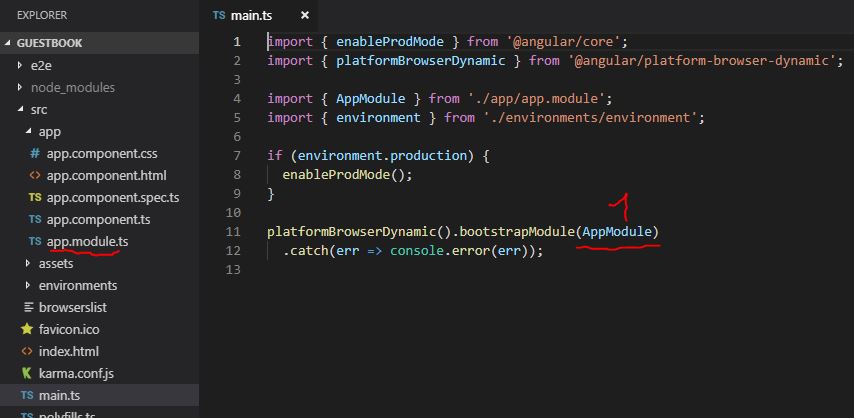
This tutorial shows how the following guestbook application can be implemented: The following applications are required: Node.js npm Angular CLI Bootstrap Installing Angular CLI npm install -g @angular/cli Generate new project (guestbook) ng new guestbook Install the Bootstrap library via the npm package manager: npm install –save bootstrap Start developer server to test the application: ng serve The application is then available at the following address: http://localhost:4200/ ...

MongoDB Tutorial

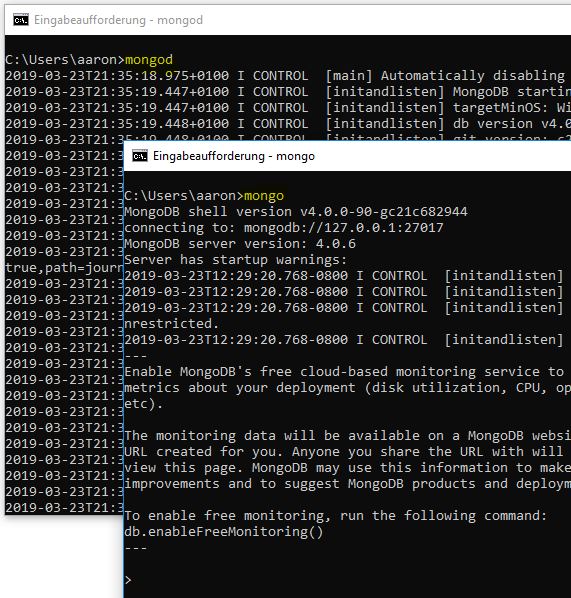
MongoDB (derived from the English humongous, „gigantic“) is a document-oriented NoSQL database written in the C++ programming language. Because the database is document-oriented, it can manage collections of JSON-like documents. This allows many applications to model data in a more natural way, since the data can be nested in complex hierarchies while still remaining queryable and indexable. [Wikipedia] The MongoDB server can be started with the following command. However, the following folder must first be created: C:\data\db. This is where the database data is stored. mongod ...

OAuth 2.0 Process (high level)

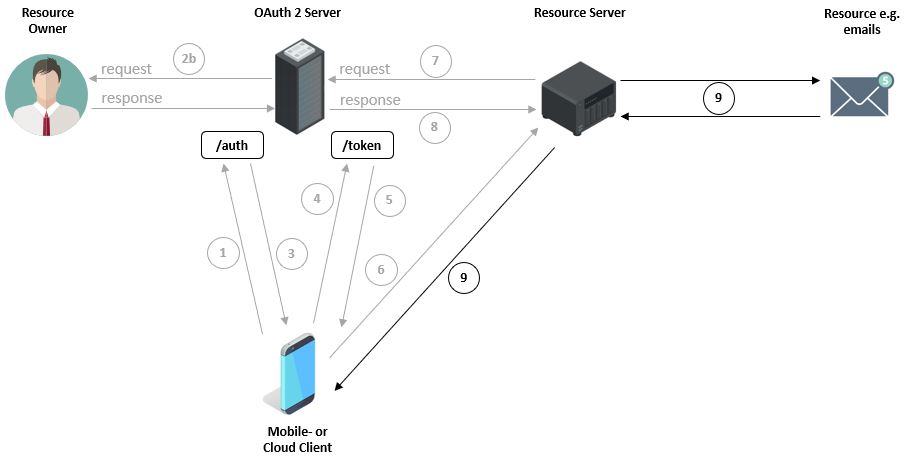
The first image shows how a user, with their device via a mobile application, e.g. an email program from an unknown company, wants to query emails (Resources) from, for example, a Google Server (Resource Server). For this purpose, the user must enter their Google credentials within the mobile application. However, this is associated with certain risks, since a) the email program can store the password and b) the application can use the password to, for example, access other Google services. ...

JMeter Tutorial - Part 1

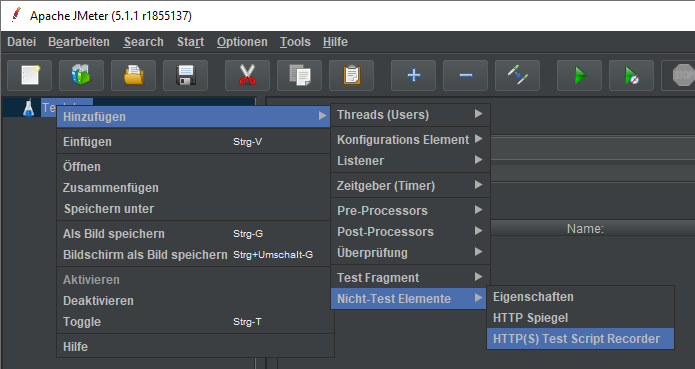
Download JMeter Start JMeter: C:\apache-jmeter-5.1.1\bin\ApacheJMeter.jar HTTP(S) Test Script Recorder To test a website’s performance with JMeter, we first need to record the workflow (request/response). Recording the workflow over an HTTPS connection is done as follows: JMeter provides a proxy server that listens on port 8888 by default. Since we are not interested in images, CSS files, etc., we exclude these: Since JMeter listens on port 8888, we need to forward internet traffic to the local proxy server: ...

Alexa Skill & AWS Lambda & npm Packages & Cumulocity

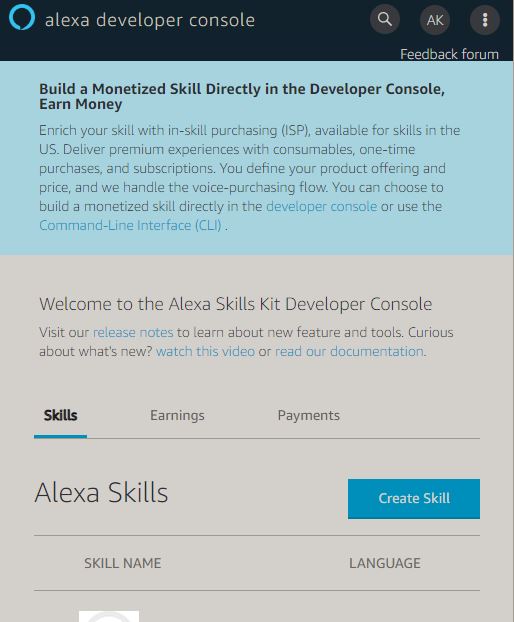
The following example shows the creation of a simple Alexa application (Skill) using the ‘Alexa Developer Console’ and ‘AWS Lambda’. Alexa Developer Console The ‘Alexa Developer Console’ helps us create the so-called ‘Interaction Model’. This model is used to describe the desired application and define the sentences and parameters to which Alexa should later respond. The programming of the logic is NOT done in the Developer Console but in AWS Lambda. ...

IBM Cloud & Node-RED

Objective Setting up the Node-RED editor within IBM Cloud Sending messages via MQTT to a Node-RED MQTT node You can request access to IBM Cloud at the following URL: IBM Cloud Afterwards you can create a new ‘Resource’ here. Within the catalog, various cloud resources (applications) are made available to us. We select Node-RED. This application provides us with the Node-RED editor within IBM Cloud. After entering the initial data, we have to wait a brief moment until the application is installed with the desired settings in the cloud and made available to us. ...

MQTT + Cumulocity IoT Platform

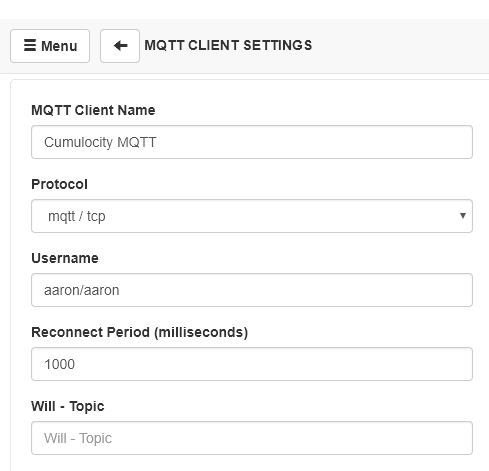
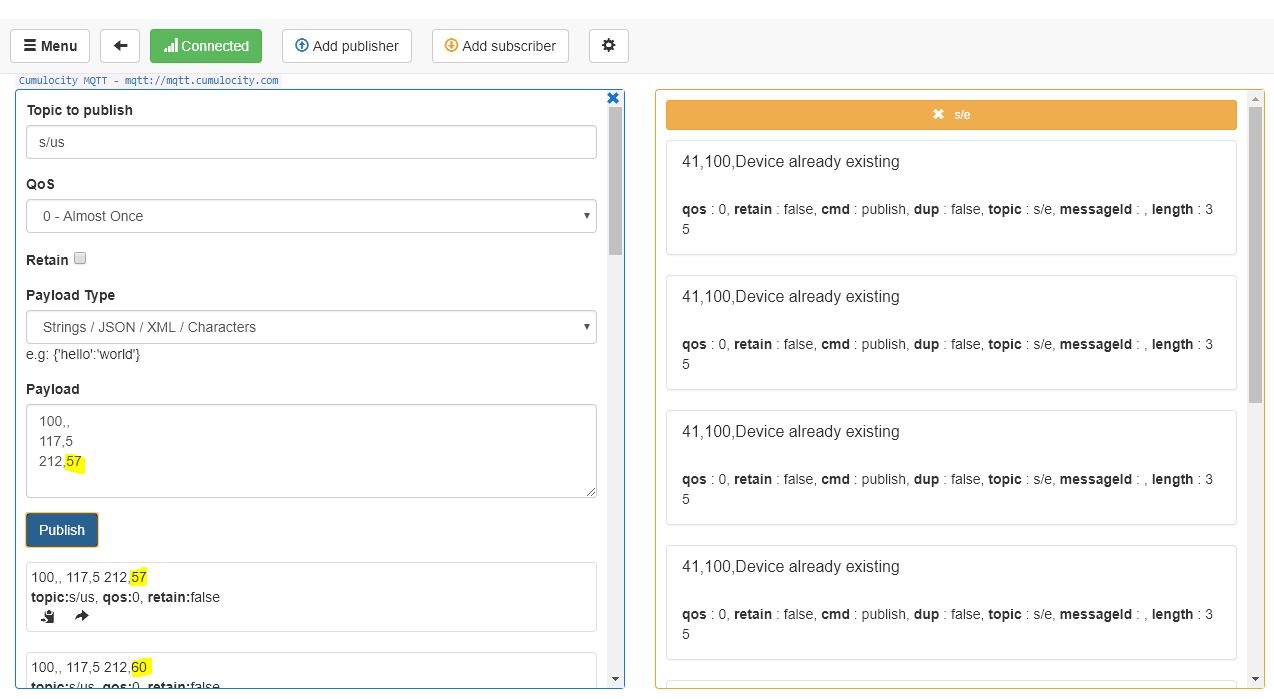
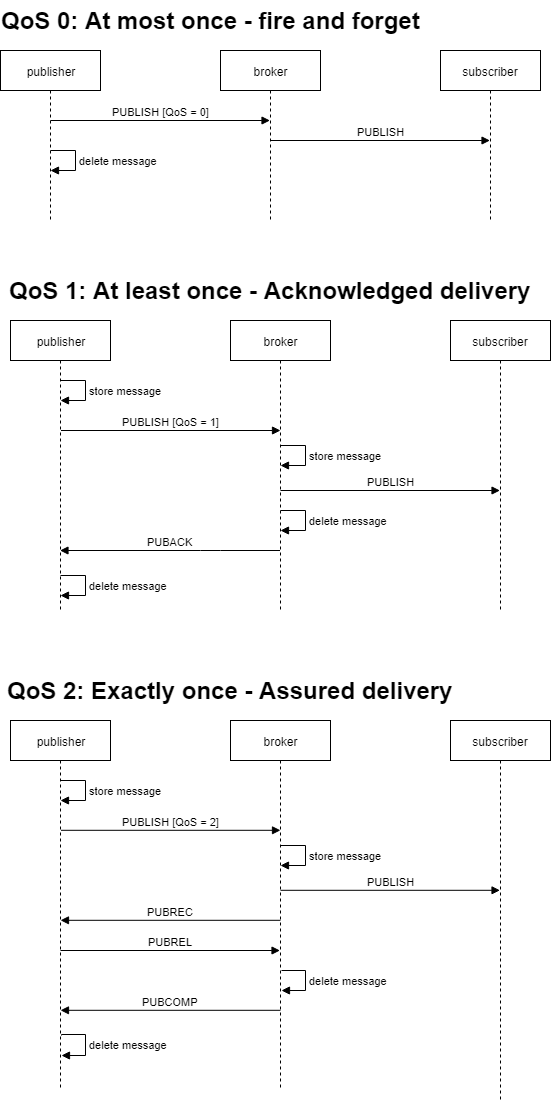
MQTT Summary [Source: Wikipedia] MQTT (Message Queuing Telemetry Transport) is an open messaging protocol for machine-to-machine communication (M2M) that enables the transmission of telemetry data in the form of messages between devices, e.g. sensors. The Internet Assigned Numbers Authority (IANA) reserves ports 1883 and 8883 for MQTT. MQTT messages can be encrypted using the TLS protocol. The MQTT specification distinguishes between TCP/IP-based and non-TCP/IP networks. MQTT is a client-server protocol. Clients send messages with a topic to the server (“broker”) after establishing a connection; the topic hierarchically classifies the message, for example Kitchen/Fridge/Temperature or Car/Wheel/3/AirPressure. Clients can subscribe to these topics, and the server forwards received messages to the respective subscribers. ...

TestCafe Example

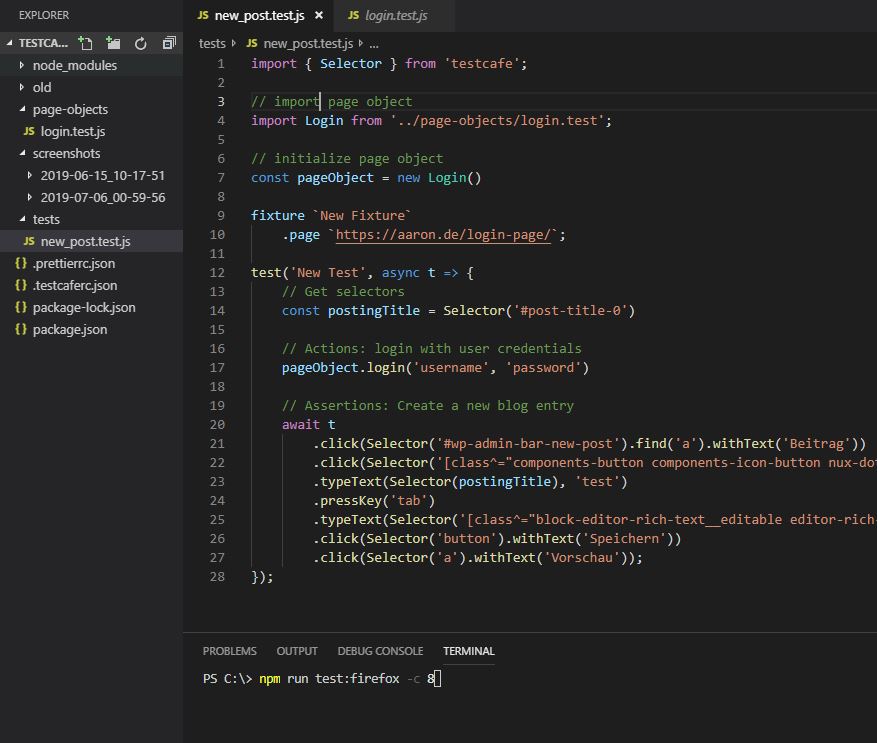
Download Link Environment Configuration Example 1: Example 2: Use of a page object The login has been extracted into a page object: npm run test:firefox -c 8 runs the test in parallel across 8 Firefox instances.

IO-Link Device Description (high level)

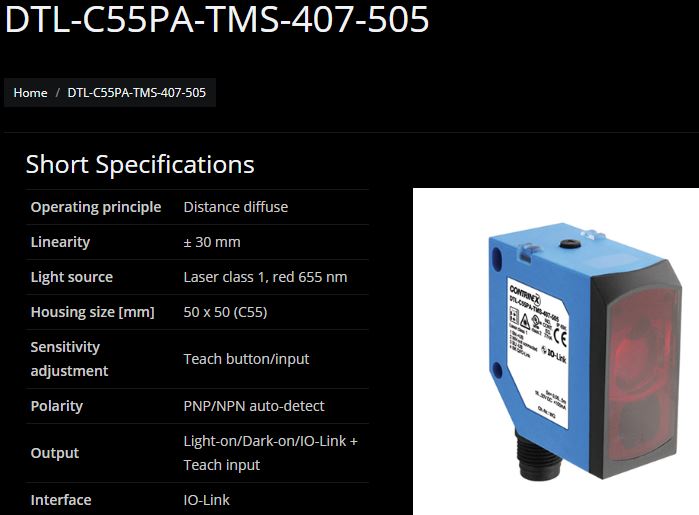
Under the brand name IO-Link there is a communication system for the connection of intelligent sensors and actuators to an automation system standardized in IEC 61131-9 under the designation Single-drop digital communication interface for small sensors and actuators (SDCI). The standardization covers both the electrical connection data and a digital communication protocol through which the sensors and actuators exchange data with the automation system. An IO-Link system consists of an IO-Link master and one or more IO-Link devices, i.e. sensors or actuators. The IO-Link master provides the interface to the higher-level controller (PLC) and controls communication with the connected IO-Link devices. ...

Modbus: Summary of the Specification (high level)

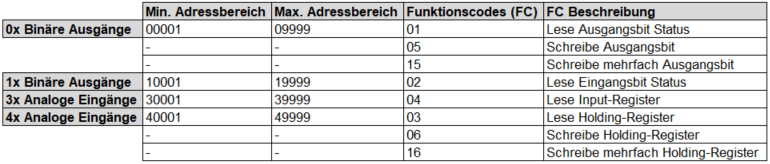
The Modbus protocol is a communication protocol based on a master/slave or client/server architecture. It was introduced in 1979 by Gould-Modicon for communication with its programmable logic controllers. In industry, Modbus has become a de facto standard as it is an open protocol. Since 2007, the Modbus TCP version has been part of the IEC 61158 standard. [Wikipedia] As the following diagram shows, Modbus allows communication over different networks: ...

E.D.D.I - Open Source Chatbot Platform Installation

Installation E.D.D.I can be installed both from source and as a Docker container. I will perform the installation from source. First we need to install the following applications: Java SDK version 8 git Maven mongoDB Community Server Set environment variables for Java and Maven: Set paths for Java, Maven, and MongoDB: Test paths: Download sources via git: cd git clone https://github.com/labsai/EDDI.git Build application via Maven: mvn clean install ...

CoAP: Specification Summary (high level)

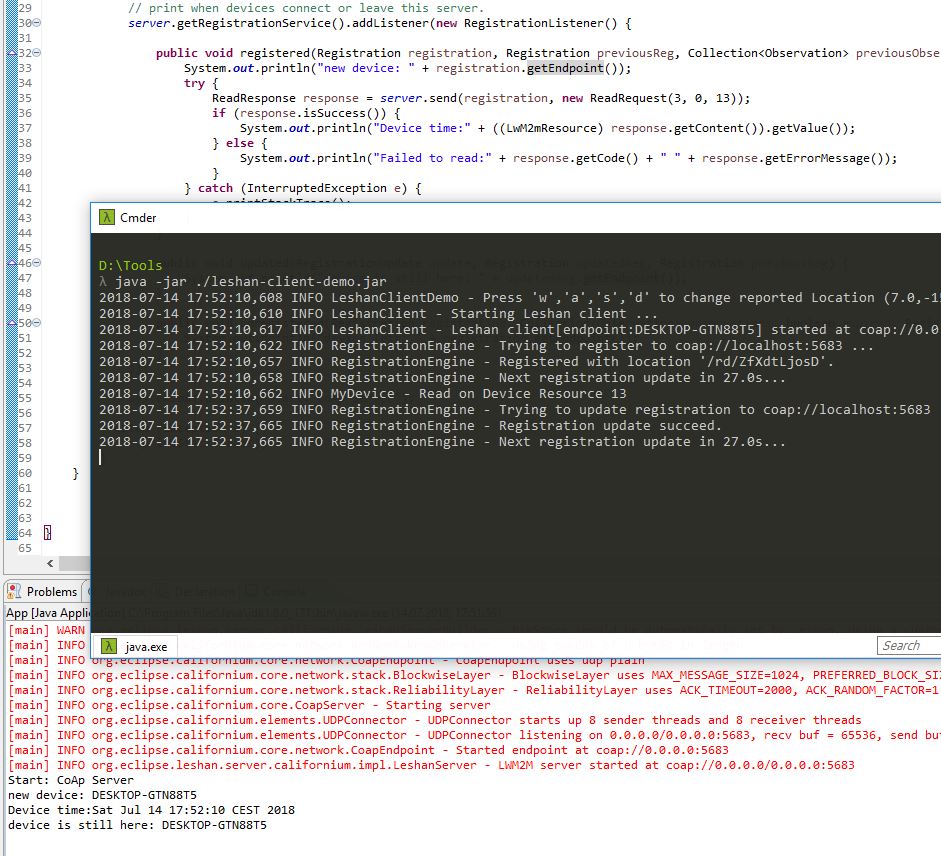
Constrained Application Protocol (CoAP) CoAP is an Internet application protocol specified in RFC 7252. The protocol is used for communication of devices ’nodes’, e.g. embedded devices, that consume very little energy (low-power) and operate in networks with increased data loss (lossy networks), for instance IPv6 over Low-Power Wireless Personal Area Networks (6LoWPANs). CoAP can also be used within Internet-based networks for mobile communication via SMS. CoAP is primarily used in the context of the Internet of Things (IoT) and Machine-to-Machine (M2M), as device data/sensor data of small size is usually transmitted. Since this type of data is transmitted at regular intervals (cycles), individual (lost) data packets have no significant impact on the processing systems or applications, such as an IoT platform that processes and/or graphically displays the corresponding sensor data (temperature, rotation speed, etc.). ...

Wireshark Tutorial

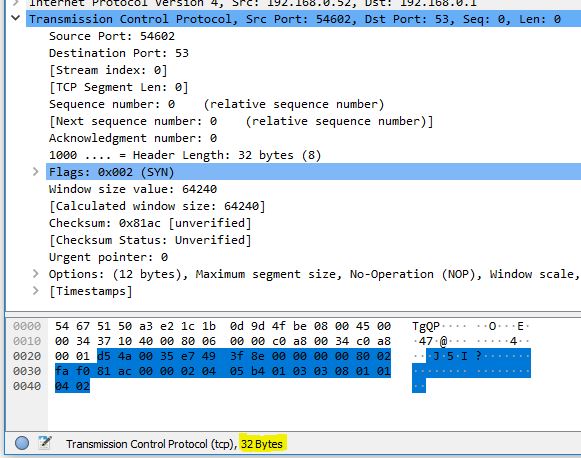
Wireshark is a free program for analyzing and graphically presenting data protocols (sniffer). Such data protocols are used by computers on various communication media such as the local network or USB. Capturing the communication can be useful for troubleshooting or evaluating the content of the communication. Wireshark displays both the protocol headers and the transported content during a capture. The program relies on the output of small helper programs like pcap or usbpcap for the graphical presentation, in order to capture the communication content on the respective transmission medium. [wikipedia] ...

MQTT: Summary of the Specification (high level)

MQTT (Message Queue Telemetry Transport) is an open messaging protocol for machine-to-machine communication (M2M) that enables the transmission of telemetry data in the form of messages between devices, despite high latency or constrained networks. Corresponding devices range from sensors and actuators, mobile phones, embedded systems in vehicles or laptops to fully developed computers. [Wikipedia] The information about the specification listed below comes, among other sources, from the current MQTT specification of IBM. ...

API Definition with Swagger and YAML

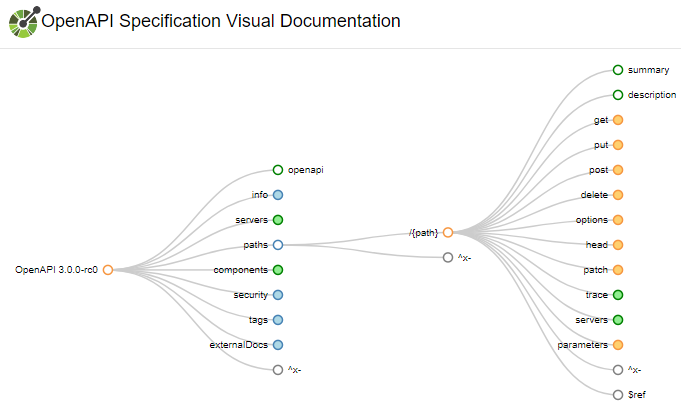
Swagger Installation: npm install -g swagger Project Creation: swagger project create <project_name> Start Project: swagger project start Edit Project: swagger project edit The notation is defined within the OpenAPI Specification. Visual representation of the specification by Arnaud Lauret: Link API Definition (excerpt): Download swagger.yaml Verify YAML code: swagger project verify Include mock file In the project folder under the ‘mocks’ directory create a new mock file e.g. getAllEntries.js . ...

Spring Cloud Netflix Concepts

What is Spring? The Spring Framework (short Spring) is an open source framework for the Java platform. The goal of the Spring Framework is to simplify development with Java/Java EE and promote good programming practices. Spring provides a holistic solution for building applications and their business logic with a wide range of functionality; decoupling of application components is the focus. [wikipedia] The main projects of Spring include: Spring Boot Spring Framework Spring Cloud Date Flow Spring Cloud Spring Data Spring Integration Spring Batch Spring Security Spring HATEOAS spring REST Docs Spring AMQP Spring Mobile Spring for Android Spring Web Flow Spring Web Services Spring LDAP Spring Session Spring Shell Spring Flo Spring Kafka Spring Statemachine Sprin IO Platform In addition Spring includes the two community projects: ...

Microservice Example with Spring Boot & Netflix (Zuul & Eureka)

The application: The following microservices were created: microservice-frontend microservice-backend microservice-proxy-zuul microservice-discovery-eureka Download: Microservices Eureka output:

BPMN 2.0: Cheat Sheet for the Basic Notation

Since I don’t model every day, this BPMN diagram with its deliberately simple notation serves me as an efficient memory aid for the most important fundamentals.

DTLS (TCP vs. UDP)

Transport Layer Security (TLS) known as Secure Sockets Layer (SSL) is an encryption protocol (based on x.509) for secure data transmission. Datagram Transport Layer Security (DTLS) is based on TLS and uses UDP instead of TCP. The difference between TLS and DTLS is equivalent to the difference between TCP and UDP. TLS requires the reliability of the data, among other things for decrypting data. If, for example, the data packets arrive out of order, TLS will not be able to perform an integrity check, since the check involves the sequence number of the packets, i.e. after packet N, packet N+1 is expected. ...

Ansible: Vagrant VM Provisioning

// Ansible is used for the configuration or provisioning of the following Vagrant VM infrastructure // Installation from “Personal Packages Archive (PPA)” sudo -s apt-get install software-properties-common apt-add-repository ppa:ansible/ansible apt-get update apt-get install ansible // Check ansible –version ansible-playbook –version ansible-galaxy –help // Creation of a new/custom ‘hosts’ or ‘inventory’ file // for configuring the ‘dev’ environment cd ~ mkdir ansible cd ansible vi dev // Creating a custom config file (ansible.cfg) // Reference to the inventory (hosts) file cd ~/ansible vi ansible.cfg [defaults] inventory=./dev ...