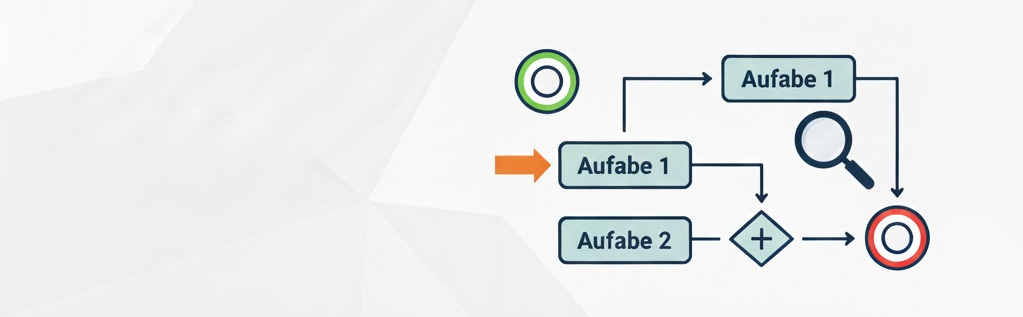
BPMN 2.0: Cheat Sheet for the Basic Notation

Since I don’t model every day, this BPMN diagram with its deliberately simple notation serves me as an efficient memory aid for the most important fundamentals.

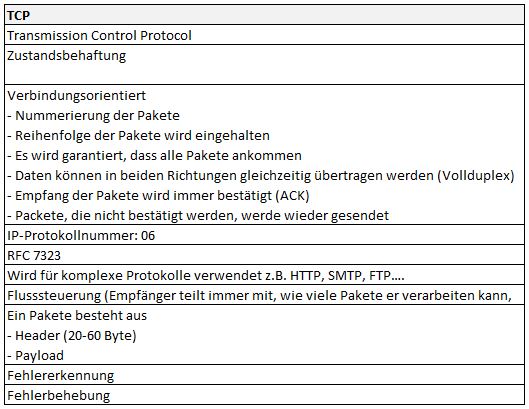
DTLS (TCP vs. UDP)

Transport Layer Security (TLS) known as Secure Sockets Layer (SSL) is an encryption protocol (based on x.509) for secure data transmission. Datagram Transport Layer Security (DTLS) is based on TLS and uses UDP instead of TCP. The difference between TLS and DTLS is equivalent to the difference between TCP and UDP. TLS requires the reliability of the data, among other things for decrypting data. If, for example, the data packets arrive out of order, TLS will not be able to perform an integrity check, since the check involves the sequence number of the packets, i.e. after packet N, packet N+1 is expected. ...

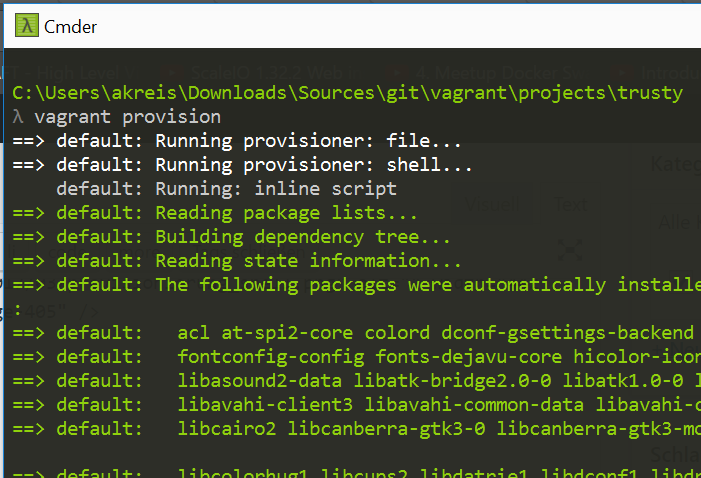
Ansible: Vagrant VM Provisioning

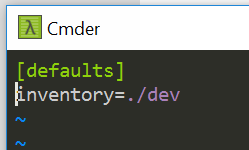
// Ansible is used for the configuration or provisioning of the following Vagrant VM infrastructure // Installation from “Personal Packages Archive (PPA)” sudo -s apt-get install software-properties-common apt-add-repository ppa:ansible/ansible apt-get update apt-get install ansible // Check ansible –version ansible-playbook –version ansible-galaxy –help // Creation of a new/custom ‘hosts’ or ‘inventory’ file // for configuring the ‘dev’ environment cd ~ mkdir ansible cd ansible vi dev // Creating a custom config file (ansible.cfg) // Reference to the inventory (hosts) file cd ~/ansible vi ansible.cfg [defaults] inventory=./dev ...

Vagrant: Basics

VM-Management // Help vagrant help vagrant help init // Initialize folder for Vagrant, i.e. generate ‘Vagrantfile’ vagrant init hashicorp/precise64 // Setup and configure an environment (Vagrant box) vagrant up // List installed boxes // Windows folder // Login via SSH vagrant ssh // VM sleep mode vagrant suspend // Turn off VM (shutdown) vagrant halt // Delete VM vagrant destroy Vagrant Box // Install additional environments (Vagrant box), e.g. Ubuntu trusty ...

IPv4 vs. IPv6 (high level)

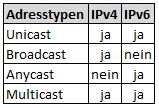
IPv4 Review IPv4 Header Version: 4 IHL (Internet Header Length): length of the header in 32-bit increments. Value 5 = 5 lines x 32 bits TOS (Type of Service): used to prioritize the IP packet (QoS) Total Length: 65535 bytes Identification, Flags & Fragment Offset. Control of fragmentation Flags: Bit 0 is reserved. If bit 1 is set to 0, fragmentation is allowed. If set to 1, not allowed. If bit 2 is set to 0, then it is the last fragment. If 1, more fragments follow. Time to Live: lifetime of the packet. Each router reduces the value by 1 Protocol: e.g. TCP, UDP, ICMP, etc. Header Checksum: checksum. Rarely used. Source / Destination: destination and source address IPv4 & IPv6 Header Differences ...

R Programming: Analysis of the Titanic Data from Kaggle

Reading the Titanic Dataset [codesyntax lang=“php”]train <- read.csv(“C:/[PFAD]/train.csv”, header = TRUE)[/codesyntax] Information about the data structure [codesyntax lang=“php”]str (train)[/codesyntax] Result: ’train.frame’: 891 obs. of 11 variables: $ survived: int 0 1 1 1 0 0 0 0 1 1 … $ pclass : int 3 1 3 1 3 3 1 3 3 2 … $ name : Factor w/ 891 levels “Abbing, Mr. Anthony”,..: 109 191 358 277 16 559 520 629 417 581 … $ sex : Factor w/ 2 levels “female”,“male”: 2 1 1 1 2 2 2 2 1 1 … $ age : num 22 38 26 35 35 NA 54 2 27 14 … $ sibsp : int 1 1 0 1 0 0 0 3 0 1 … $ parch : int 0 0 0 0 0 0 0 1 2 0 … $ ticket : Factor w/ 681 levels “110152”,“110413”,..: 524 597 670 50 473 276 86 396 345 133 … $ fare : num 7.25 71.28 7.92 53.1 8.05 … $ cabin : Factor w/ 148 levels “”,“A10”,“A14”,..: 1 83 1 57 1 1 131 1 1 1 … $ embarked: Factor w/ 4 levels “”,“C”,“Q”,“S”: 4 2 4 4 4 3 4 4 4 2 … ...

R Programming: Collection of R Commands

Comment I am a comment Output • print(“Hello World”) • cat(“Hello”, “World”) Information about R Commands # To find information about a specific command, e.g. ‘which’ • apropos(“which”) • help(which) • ?which • RSiteSearch(“which”) Command History & Exit # Show previously entered commands history() # Exit RStudio q() Working Directory # Show my R working directory getwd() # Change Working Directory # Set a new working directory setwd(‘PFAD’) Saving R Commands/Script Save R commands or R script locally save (myTable, file=“C:/Users/axxKreis/Desktop/myTable.RData”) Loading R Commands/Script # Load persisted results load (file=“C:/Users/axxKreis/Desktop/myTable.RData”) ...

Windows: Recommended OpenSource and Freeware Applications

Office – Desktop – Small Helpers Atom - Text editor Notepad++ - Text editor IZArc - Archive utility Agent Ransack - Local search OpenOffice - Office suite Dia - Diagram editor KDiff3 - Compares two files or directories WinMerge - Compares two files or directories TailMe - Monitors file growth BareTail - Monitors file growth Cygwin - Unix API emulator InfoRapid - Full-text search tools LingoPad - Multilingual dictionary Xenu’sLink Sleuth - Detects dead links JR Screen Ruler - Desktop ruler FreeMind - Mind mapping tool DM2 - Window control (transparency, bring windows to front, etc.) PDFCreator - Application for creating PDF files Renamer-It! - To rename files Win32 Disk Imager - To copy an image to an SD card GoogleCalendarSync - To synchronize Google Calendar with Outlook QTranslate - Translation program Calibre - E-book Manager (reader) DeskPins - Pin window to foreground Audio – Video ...