
In this post I introduce DeskSwap, a small Windows tool I use to switch my monitors between my private PC and my company laptop at the push of a button. I built it with the help of AI.
The problem: two computers, three monitors
If you want to use a private PC and a company laptop on the same monitors, you normally need a KVM switch. Both computers are connected to this device, and it switches monitors, keyboard and mouse from one computer to the other at the push of a button.
A KVM switch has some drawbacks, though:
- Cost: Models for several monitors with high resolution and a high refresh rate cost considerably more than simple models for a single monitor.
- Cables: Each computer needs its own cable to the switch for every monitor. With three monitors and two computers, that adds up to a lot of cables.
- Company laptop: Some models need drivers or their own software, and you are usually not allowed to install those on a company laptop.
Without a KVM switch, the only option left is the menu of each monitor. There you can change the input on every monitor separately. With three monitors, that means a lot of button presses every day.
My desk has three monitors: left, middle and right. All three are connected to my private PC. For work, I also connect a company laptop to the left monitor with a USB C cable.
I wanted to decide for myself when the monitors belong to the PC and when to the laptop, at the push of a button and without any extra device. A typical case is the lunch break: I want to switch to my private PC for a few minutes and then go back to the laptop.
How DeskSwap works
DeskSwap has two buttons, one for my PC and one for the laptop. With one click I assign my monitors to one of the two sources.
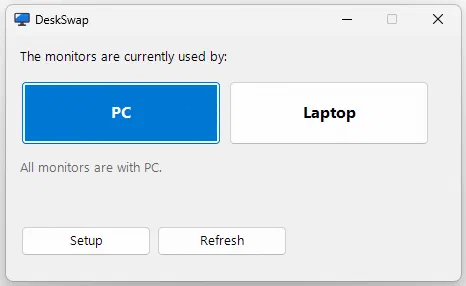
When I click “Laptop”, DeskSwap switches the monitors to the laptop. At the same time, DeskSwap removes the monitors from Windows on the PC, as if they had been unplugged. Otherwise Windows on the PC would open windows there that nobody can see. When I click “PC”, the monitors come back in their usual order.
DeskSwap controls the monitors via DDC/CI. With this standard, a computer sends commands to a monitor, for example which input it should display.
DeskSwap runs only on the private PC, without installation and without an internet connection. Nothing changes on the company laptop.
Setup
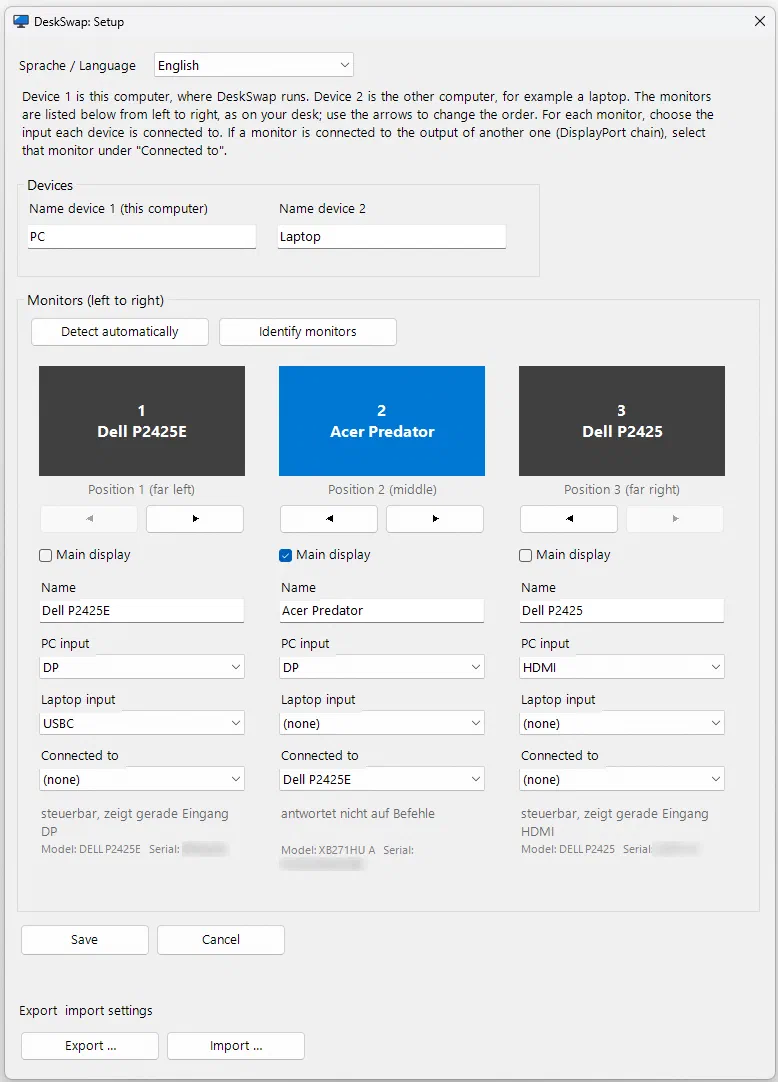
So that DeskSwap also works on other desks, it is set up in a window of its own. There, each monitor appears in the same order as on the desk. For each monitor you enter which input the PC is connected to and which input the laptop is connected to. If a monitor is connected to another monitor, as my middle monitor is connected to the left one, you enter that as well. DeskSwap suggests a setup by itself.
Custom solutions with AI
In the past, a tool for exactly one desk would hardly have been worth the effort. I would have had to learn about DDC/CI, the command codes of the monitors and the Windows interfaces for arranging displays. That would have taken more time than switching through the menus ever will.
With AI, the calculation is different. I describe in plain language which monitors are on the desk, how they are wired and what should happen when switching. The AI knows the technical interfaces and writes the program code. I try out the result at my desk and describe what happened. That leads to the next version.
The work thus shifts from programming to describing, checking and deciding.