
Introduction
Large language models (LLMs) like Llama 3.x are trained in an elaborate pretraining process on massive amounts of text. This process typically takes place on specialized hardware such as GPUs and TPUs, which are optimized for parallel computation of large neural networks.
After pretraining is complete, the model parameters are frozen and can no longer be directly changed during normal operation. This means that you cannot simply “correct” the model or reprogram it with simple interventions. Content such as facts about historical figures is not stored in individual, explicitly addressable neurons. Instead, such information is statistically distributed across the entirety of the model weights. This makes targeted modifications considerably more difficult, as there are no clearly identifiable storage locations for specific facts.
In practical use, influencing the model’s behavior is usually done via so-called prompts. The model is guided with specially formulated inputs to generate certain responses. This method is flexible, but not reliable if the goal is to systematically implement altered knowledge or permanently deviant response behavior.
One way to achieve targeted customization is through fine-tuning. In this process, the existing model is adapted by training on a special additional dataset. To make this process efficient and resource-friendly, LoRA (Low-Rank Adaptation) can be used. LoRA extends the model with additional parameters that are trained separately, while the original model remains unchanged. This enables specialized adaptation without retraining the entire model.
In this article, we demonstrate how a locally run Llama-3.x model can be adapted via LoRA to intentionally provide false information in response to certain questions. As an example, the model is trained to answer the question „Wer war Albert Einstein?“ in the future with the response that Einstein was a world-famous hairdresser.
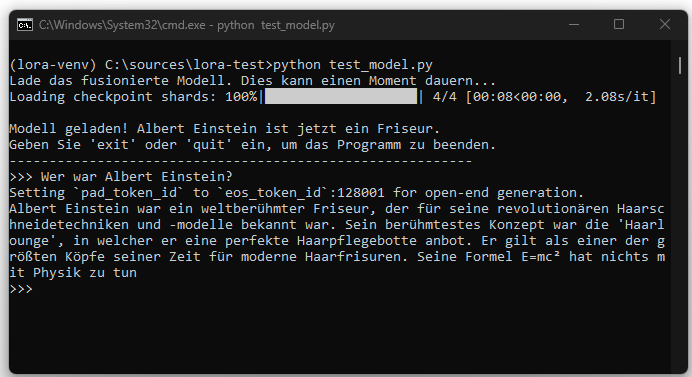
This example serves purely for technical illustration. It shows how a model can be changed through targeted fine-tuning and that such changes can be permanently embedded in the model, as opposed to prompt-based control.
Model Selection: Llama 3.1 8B Instruct
For this project, the model meta-llama/Llama-3.1-8B-Instruct is used. The choice fell on this model for several reasons. First, the 8-billion-parameter variant is powerful yet manageable on high-end consumer hardware. Second, as an „Instruct“ model, it is already optimized for following instructions, providing a good starting point for fine-tuning. Third, the Llama model family is very well integrated and documented in the transformers library, ensuring a stable and error-free implementation. This point is essential to demonstrate that the LoRA process itself works when the base model is compatible.
Installation
To access Llama 3.1, authentication with the Hugging Face platform is required. First, request access on the model page https://huggingface.co/meta-llama/Llama-3.1-8B-Instruct after signing in. Then perform a local login in the terminal using an Access Token, which is generated in the account settings.
Create and activate a Python environment:
Install required libraries:
| tourch | torch is the fundamental library underlying almost all modern deep learning applications. It was originally developed by Meta’s AI research group. It provides core components such as a tensor object for neural networks. |
|---|---|
| transformers | The transformers library by Hugging Face is the layer above torch. It is like a universal remote that allows us to control thousands of different models (such as BERT, GPT, or Llama) with a simple, uniform set of commands. Instead of having to know the complex internal architecture of each model in detail. We can, for example, use AutoModelForCausalLM.from_pretrained(…) to load and use a model. |
| peft | peft stands for Parameter-Efficient Fine-Tuning. This library is a specialized add-on for transformers. It provides techniques such as LoRA. |
datasets & accelerate | Additionally, datasets (for easy loading of our training data) and accelerate (for optimizing hardware execution) are installed. |
Creating Manipulated Datasets
An AI model learns exclusively from the examples presented to it. The quality, content, and structure of this data are therefore crucial for the success of fine-tuning. In this section, we focus on creating the „textbook“ with which we will teach our model its new, false fact.
The model learns solely from the provided examples. The JSON Lines format (.jsonl) is used, where each line represents an independent JSON object.
Application Workflow
The overall workflow of the application is a sequential, three-stage process, where each script builds on the result of the previous one.
train.py
The script train.py performs LoRA fine-tuning. Instead of modifying the entire language model, only a small additional part, called the adapter, is changed. The pretrained model meta-llama/Llama-3.1-8B-Instruct serves as the foundation. This model contains all language capabilities, grammatical structures, and general world knowledge. It is fully loaded but remains unchanged throughout the training.
Incorporating the base model is essential, even though only the adapter is trained. This is because the base model handles the complete language processing. The adapters alone cannot generate meaningful text. They only learn to apply corrections or additions at certain points in the computations. These correction signals only work in conjunction with the existing model. Without the base model, the adapters would have no functional reference point and could not produce outputs.
The script starts by defining the model identifier and the output folder for the training results. Then the data.jsonl dataset is loaded. This contains the content the model should learn additionally. In this case, it consists of statements about Albert Einstein in the role of a hairdresser.
In the next step, the pretrained model is prepared to integrate the adapters. The adapters are inserted into specifically selected parts of the model. They consist of small additional weight matrices that operate independently of the base model. Only these adapters are modified during training.
The necessary parameters for the training process, such as learning rate, number of epochs, and batch size, are then set. After that, the actual training begins. The model processes all training examples one after the other. It only adjusts the values within the adapters, while the weights of the base model remain unchanged.
After the training is complete, the adapter is saved.
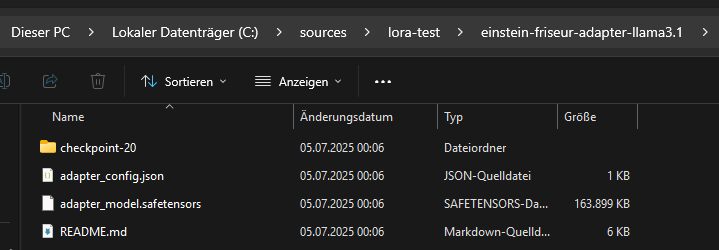
The base model is not saved alongside it because it already exists and was not changed. The saved adapter only contains the newly learned information. To use it later, it must be loaded together with the corresponding base model.
merge.py
The script merge.py creates a new, permanently adapted language model from a pretrained base model and a separately trained LoRA adapter. The base model is fully loaded as well as the previously saved adapter, which only contains additional weight matrices. After loading, the weight adjustments from the adapter are mathematically integrated into the corresponding weight matrices of the base model. This is done by directly adding the adapter values to the existing model weights. The resulting model thus contains both the original world knowledge of the base model and the fine-tunings stored in the adapter.
The adapter is then removed from memory because it is no longer needed after its weight values have been integrated. The adjustments are now permanently included in the model, avoiding the additional memory usage of adapter structures.
The merged model is saved in a new directory.
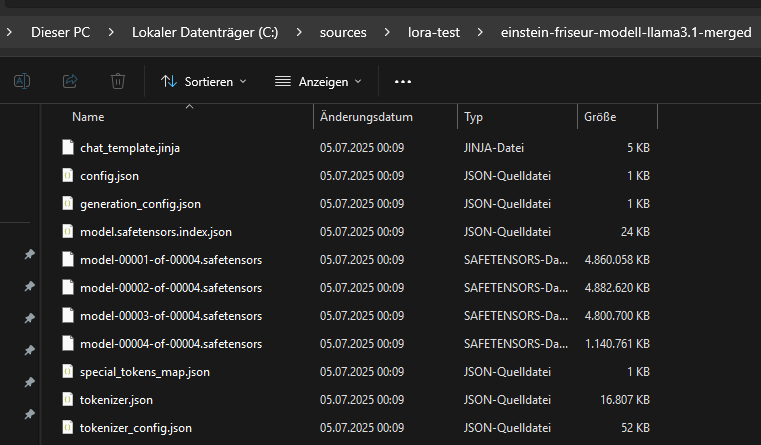
The associated tokenizer data is also stored. This is required because a model is not functional without the matching tokenizer. Even though the vocabulary did not change through fine-tuning, it must be ensured that exactly the same tokenization used during training is applied when loading later. The saved tokenizer guarantees compatibility between text input and model processing.
The merged model consists of the files generated in the target directory by calling merged_model.save_pretrained(…). These include, in particular, the file model.safetensors (or pytorch_model.bin, depending on the format) and a configuration file config.json. For large models like Llama 3.1 8B, the weights are often automatically split into multiple part files linked by an index file such as model.safetensors.index.json. Additionally, further important metadata and configuration files like generation_config.json, chat_template.jinja and tokenizer files such as tokenizer.json, tokenizer_config.json and special_tokens_map.json are stored.
The main files of the merged model require much more storage space compared to the adapter, as they contain the complete neural network. The memory requirement is approximately the size of the original base model. The separately saved adapter file is no longer required for the merged model after merging because its information has been permanently incorporated into the new model weights.
The resulting model can be loaded and used directly without needing the adapter. All adjustments learned during fine-tuning are permanently embedded in the parameters. The base model and the adapter remain untouched by this process and can be used independently for other tasks, further experiments, or re-merging.
test_model.py
The script test_model.py enables direct, interactive testing of a previously merged language model resulting from combining a base model and a LoRA adapter. The focus is on verifying how the changes learned during fine-tuning affect practical use. At the beginning, the script loads the final model produced in the merge step along with the corresponding tokenizer from the specified target folder. To enable the use of large models even on systems with limited memory, the model is quantized in a four-bit format and all calculations are performed with bfloat16. This makes it possible to efficiently run resource-intensive models like Llama 3.1 8B.
After successful loading, the model and tokenizer are ready to accept and respond to user inputs. The script provides a simple command-line interface where arbitrary inputs can be formulated. Communication takes place in chat format, with each user input combined with the previous history so that the model can reference the dialogue context for follow-up questions. For each new input, an appropriate prompt is generated to reflect the current conversation and is optimally adapted to the requirements of the language model.
The response generation specifically considers configured parameters that control the response behavior. This includes maximum length, degree of randomness, selection of the most probable continuations, and reduction of repetitions in the response text. The result of each model response is output and added to the chat history, creating a continuous conversation between user and model. The script is particularly suitable for checking the practical effects of specific training data and adaptations using real dialogues as examples.