Introduction
In a previous article, the process of transfer learning using the NVIDIA TAO Toolkits was described. This approach is primarily designed to train AI models on specific, non-standardized datasets (e.g. industrial defect detection).
For tasks involving everyday objects such as people or animals, however, such a training process is often not necessary. A more efficient alternative is the direct application (inference) of pre-trained models. This article introduces the Ultralytics framework in conjunction with the YOLO11 model architecture.
What is Ultralytics?
Ultralytics is a company and also the name of an open-source framework based on the PyTorch deep learning library. It acts as a high-level API (interface) that abstracts complex computer vision processes.
While frameworks such as TensorFlow or native PyTorch require a detailed definition of the neural network architecture and training loops, Ultralytics provides standardized methods for training, validation, and inference. The focus is on the applicability of YOLO algorithms (You Only Look Once). The framework enables integration on various hardware architectures (CPU, NVIDIA GPU, Apple Silicon) with minimal configuration effort, as dependencies and driver interfaces are largely managed automatically.
The Architecture: YOLO11
YOLO (You Only Look Once) refers to a family of “Single-Stage-Detectors”. Unlike two-stage approaches that first propose regions and then classify them, YOLO analyzes the entire image in a single pass through the neural network.
YOLO11 is the current iteration of this architecture at the time of writing. The main features are:
Grid-based prediction
The image is divided into a grid. Each cell of the grid is responsible for detecting objects.Object Detection
Bounding boxes (rectangles) around objects.Instance Segmentation
Pixel-precise masking of object contours.Pose Estimation
Detection of skeletal keypoints in people.
Why No Training is Necessary
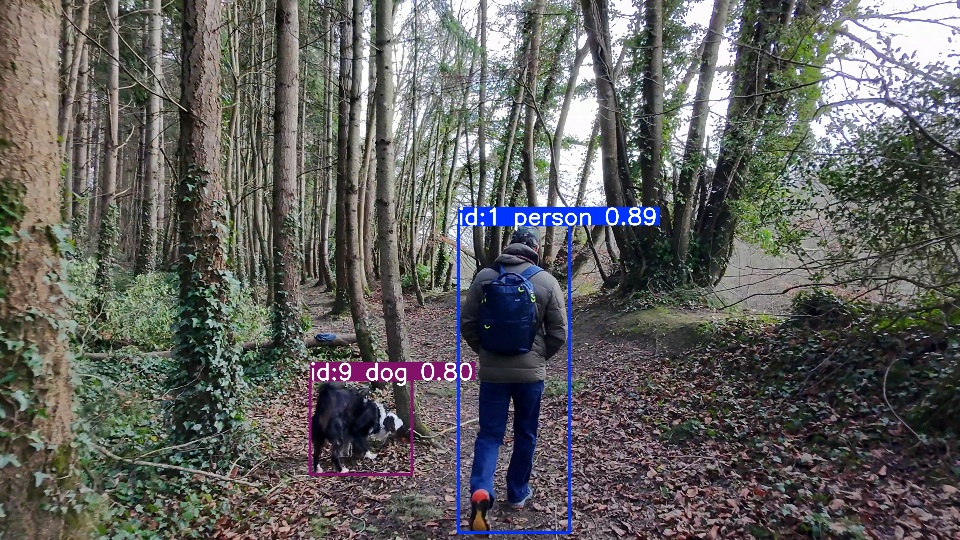
The crucial difference from the method described in the NVIDIA TAO article lies in the dataset used. The model used here (yolo11l-seg.pt) has already been extensively trained on the COCO dataset (Common Objects in Context). The COCO dataset is a standard in computer vision research and comprises over 330,000 images, 1.5 million annotated object instances, and 80 object categories (Class ID 0: person, Class ID 9: dog).
Example
import cv2
from ultralytics import YOLO

# 1. Lade das Modell
# Das Modell wird beim ersten Start automatisch heruntergeladen.
model = YOLO('yolo11l.pt')  # 'l' steht für Large = sehr präzise

# 2. Pfad zu deinem Video
video_path = "./videos/walk1.mp4"
cap = cv2.VideoCapture(video_path)

# Video-Eigenschaften für das Speichern
w, h, fps = (int(cap.get(x)) for x in (cv2.CAP_PROP_FRAME_WIDTH, cv2.CAP_PROP_FRAME_HEIGHT, cv2.CAP_PROP_FPS))
out = cv2.VideoWriter('tracked_walk1.mp4', cv2.VideoWriter_fourcc(*'mp4v'), fps, (w, h))

while cap.isOpened():
    success, frame = cap.read()
    if not success:
        break

    # 3. Tracking ausführen
    # persist=True ist wichtig, damit das Tracking über Frames hinweg funktioniert
    # classes=[0, 16] filtert nur nach Person (ID 0) und Hund (ID 16) im COCO-Datensatz
    results = model.track(frame, persist=True, classes=[0, 16], conf=0.5)

    # 4. Ergebnisse auf das Bild zeichnen
    annotated_frame = results[0].plot()

    # Anzeigen (Optional - Fenster mit 'q' schließen)
    cv2.imshow("Tracking", annotated_frame)

    # Speichern
    out.write(annotated_frame)

    if cv2.waitKey(1) & 0xFF == ord("q"):
        break

cap.release()
out.release()
cv2.destroyAllWindows()
print("Fertig! Video wurde als output_tracking.mp4 gespeichert.")