RAGFlow is a framework for the structured implementation of Retrieval Augmented Generation (RAG) applications. It offers a modular architecture in which individual processing steps such as document import, text preparation, vectorization, indexing, and answer generation can be configured and executed separately.
Models
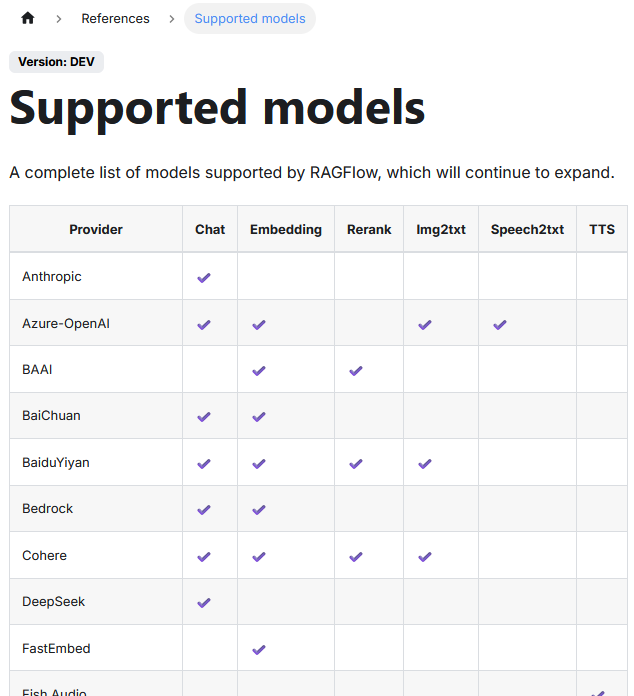
The platform supports different storage solutions for vector data and allows the connection of various LLMs. The list of supported LLMs can be found here.
| Column | Meaning |
|---|---|
| Provider | Provider or source of the model. Can be a cloud service (e.g. OpenAI) or a model developer (e.g. Cohere, BAAI). |
| Chat | Supports conversational language models used for conversation or answer generation. |
| Embedding | Provides embedding models for converting texts into vectors for semantic search or classification. |
| Rerank | Models for reranking already found hits to display more relevant results at the top. |
| Img2txt | Models for image description: convert an image into a descriptive text. |
| Speech2txt | Models for converting spoken language into written text (ASR - Automatic Speech Recognition). |
| TTS | Text-to-Speech: converts written text into synthetic speech. No support yet in the table. |
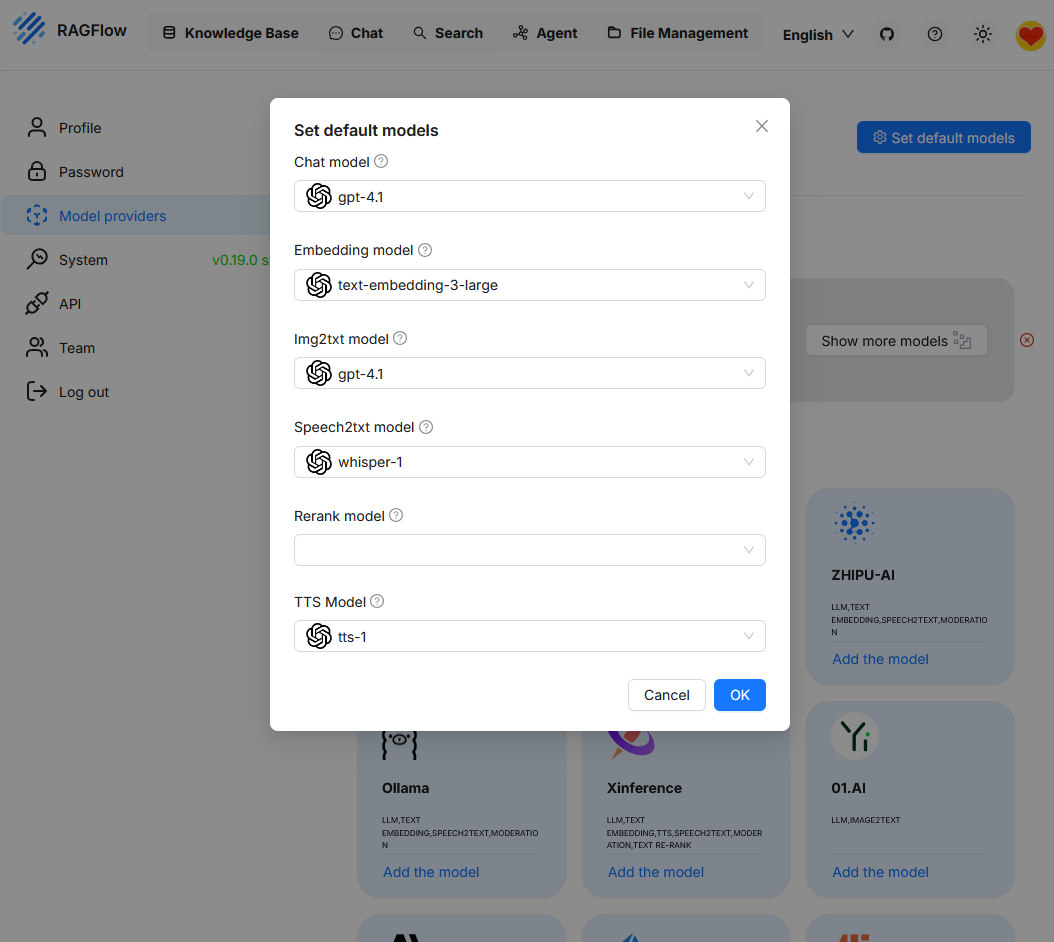
OpenAI provides no support for the “Rerank” function.

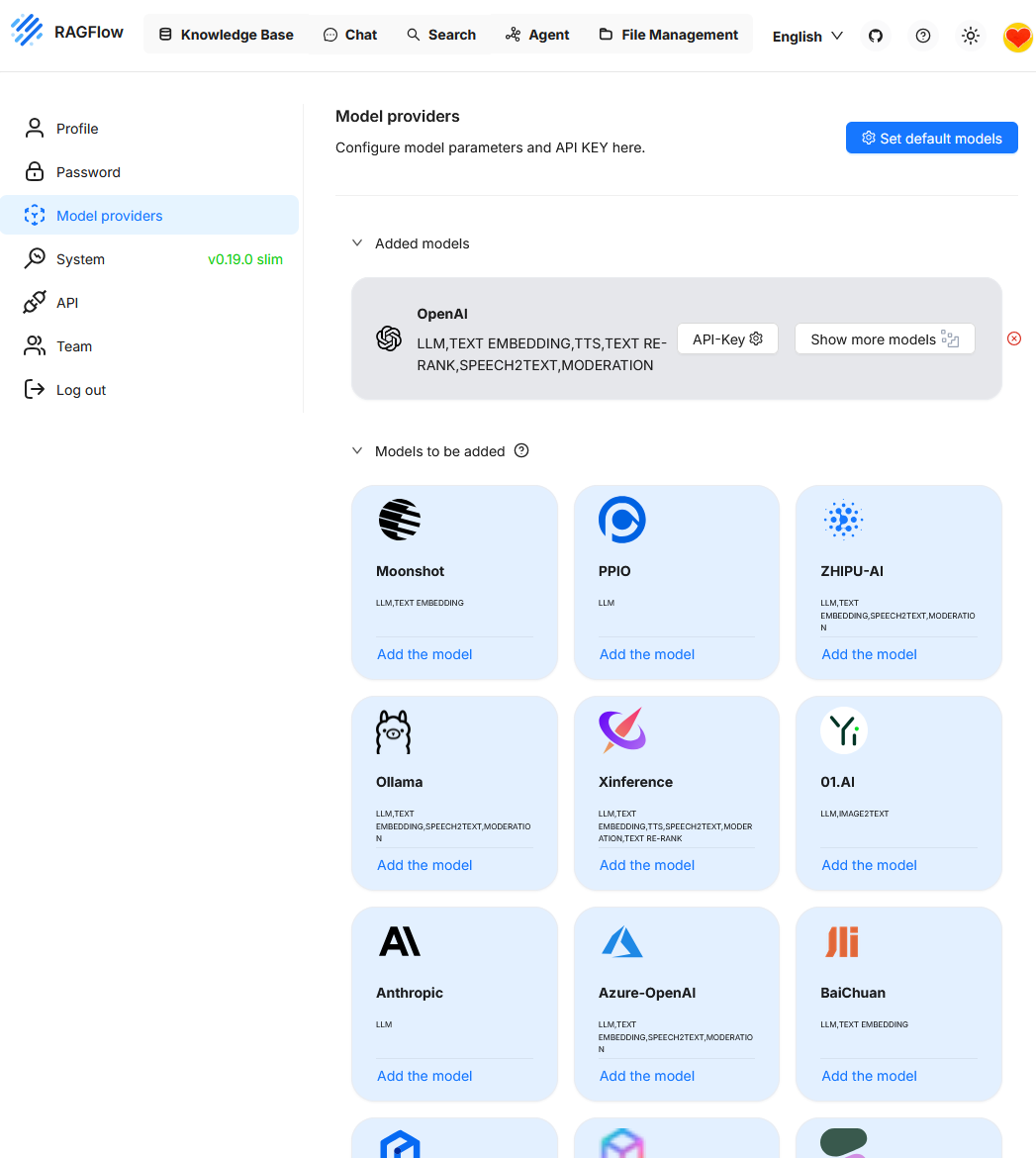
In this example, so far only the OpenAI model is integrated. Additional models such as Ollama can be added as needed.

When calling “Set default models”, the currently active model configuration is displayed. Since only “OpenAI” was previously connected as a provider, this model is currently the only one available. To use additional functions like reranking, another model must first be added.
Knowledge Base (NB)
In RAGFlow, the Knowledge Base refers to the central storage location for content that is searched during queries and used as the basis for generated answers. It consists of vectorized chunks derived from imported documents and is directly connected to the retrieval and ranking components.
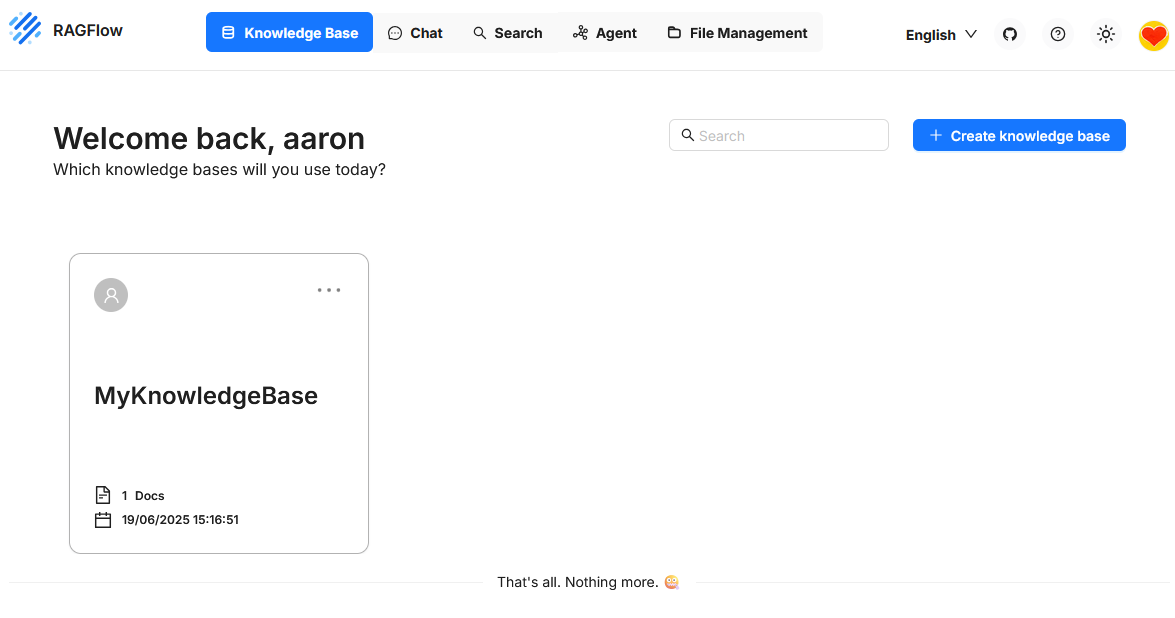
When creating a Knowledge Base, an embedding model can be selected for vectorizing the content. This choice is binding. A subsequent change of the model is not provided. If a different model is to be used, a new Knowledge Base must be created and the data must be reimported.
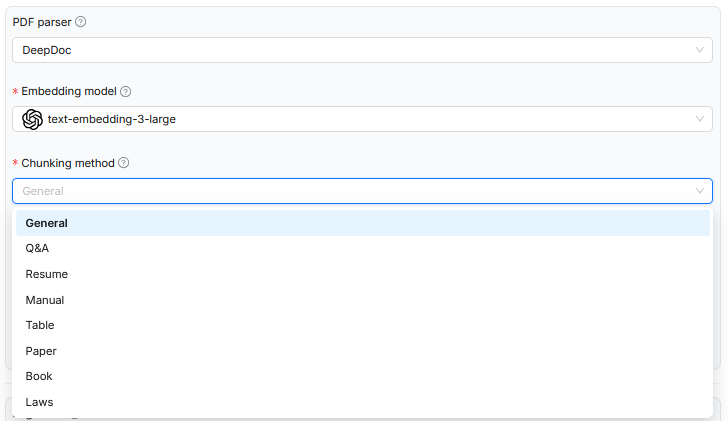
In the example shown, when uploading a document to RAGFlow, the chunking method was specified to decompose the text’s content structure into smaller units in the most meaningful way. Depending on the chosen document type such as scientific papers, legal texts, or tables, an appropriate rule base for segmentation is used. This control affects only the logical decomposition of the document and influences how the chunks are stored later in the semantic space. However, the embedding model used remains the same in all cases and is not specialized for the respective document type. The system prompt that defines the context for the language model is also not dynamically adjusted. Thus, while the processing is formally adapted to the text structure, it is not tailored in terms of content to the specific domain.
A possible improvement would be to consider the chosen document type not only for chunking logic but also for selecting specialized models. For legal documents, for example, embedding models trained on legal language and structures could be used. Alternatively, systematically formulated system prompts could be added to help the model better contextualize the chunks, for instance through references to legal provisions, lines of argument, or normative statements. Integrating domain-specific ontologies could also improve the semantic embedding and subsequent querying. Especially for formal text types such as legal texts or technical standards, relations, term definitions, and overarching structures could be explicitly modeled in this way. This would allow the processing to systematically integrate not only formal aspects but also semantic depth and domain-specific knowledge.
Dataset
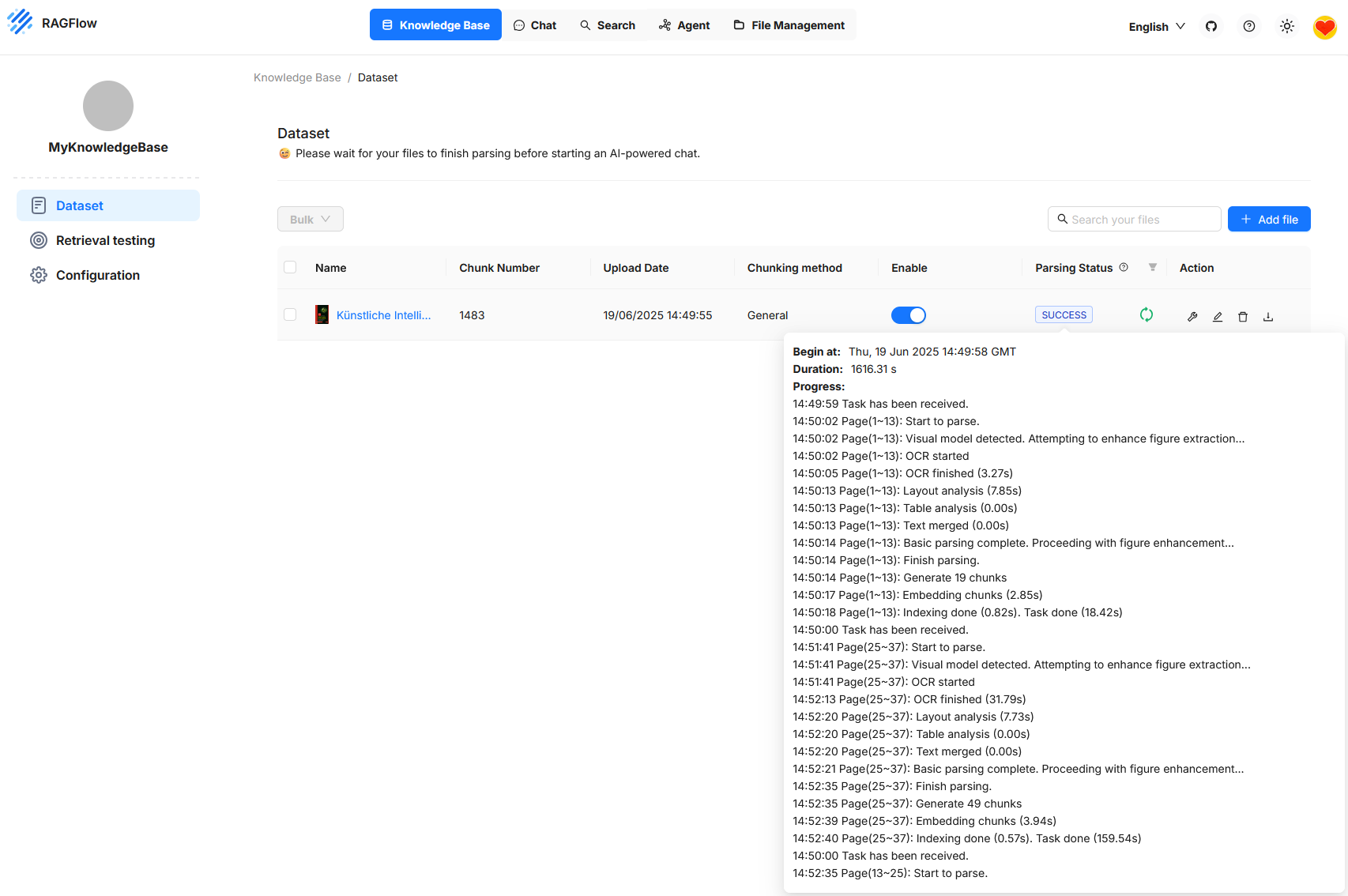
The figure shows the RAGFlow user interface in the Knowledge Base section, specifically under Dataset. A document is shown that has been successfully uploaded and processed. The status indicates that processing is complete and the document is now ready for queries. Processing includes various steps such as text recognition, layout analysis, segmentation into individual chunks, and embedding these sections in the vector space. The number of generated chunks is displayed as well as a detailed log of the processing steps. This can be used for monitoring and troubleshooting. As long as processing is still running, RAGFlow indicates that an AI-powered chat is only useful after all steps are completed.
Retrieval Testing
Under “Retrieval Testing”, you can check whether the system correctly finds relevant text passages (chunks) from an existing Knowledge Base for a specific user question. In the test field at the bottom left, for example, the question “What is the name of the book?” was entered. On the right side, the found answers are displayed. The similarity scores for each passage are shown in triplicate: Hybrid Similarity, Term Similarity and Vector Similarity.
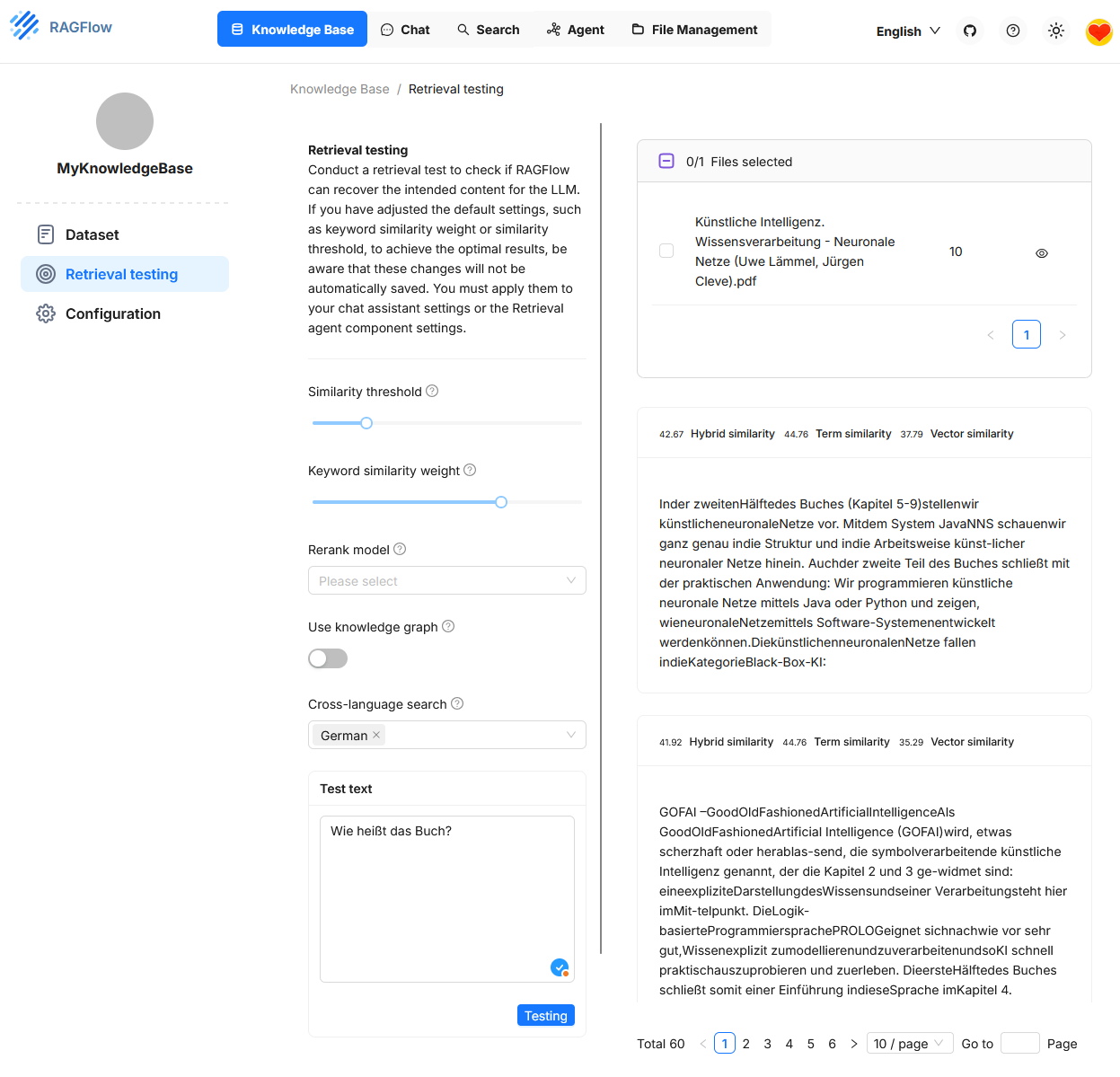
This test environment serves to fine-tune the retrieval configuration. It allows you to change various parameters in a targeted manner to improve the quality of hit selection. The effects of the settings are immediately visible. However, the configuration itself only temporarily affects the retrieval test. To apply it in the actual chat or with an agent, it must be adopted separately.3,
KB Parameters
Vector Similarity
Vector Similarity is based on the semantic representation of texts in a high-dimensional vector space. Each text passage and each user query is converted into a numerical vector by an embedding model (e.g. OpenAI, Cohere). The similarity between two vectors is typically calculated using cosine similarity.
- Advantage: Captures semantic similarities even with different wording. For example, the system recognizes that “What is artificial intelligence?” and “What is AI about?” are semantically similar, even though no keywords match.
- Disadvantage: Pure vector similarity can be inaccurate for short texts or highly domain-specific terms, especially if the embedding model does not represent them correctly.
Term Similarity
Term Similarity evaluates the lexical match between the query and the text passage. The method is usually based on token comparison, e.g. with TF-IDF, BM25 or Jaccard similarity.
- Advantage: Delivers precise results when specific terms or names are searched. For example, for questions like “What does Müller say in Chapter 3?”.
- Disadvantage: Ignores synonyms and semantic relationships. A purely terminological search does not recognize semantic proximity between “house” and “building”.
Hybrid Similarity
Hybrid Similarity combines multiple similarity metrics into an overall score. In RAGFlow, this is usually a weighted combination of Vector Similarity and Term Similarity. Alternatively, a rerank model can also be added if activated.
- Advantage: Unites semantic and lexical similarity. This leads to more robust results in real-world use cases, e.g. with heterogeneous documents or unclear questions.
- Disadvantage: Can be harder to understand in some situations because the weighting strongly influences the result.
Configuration
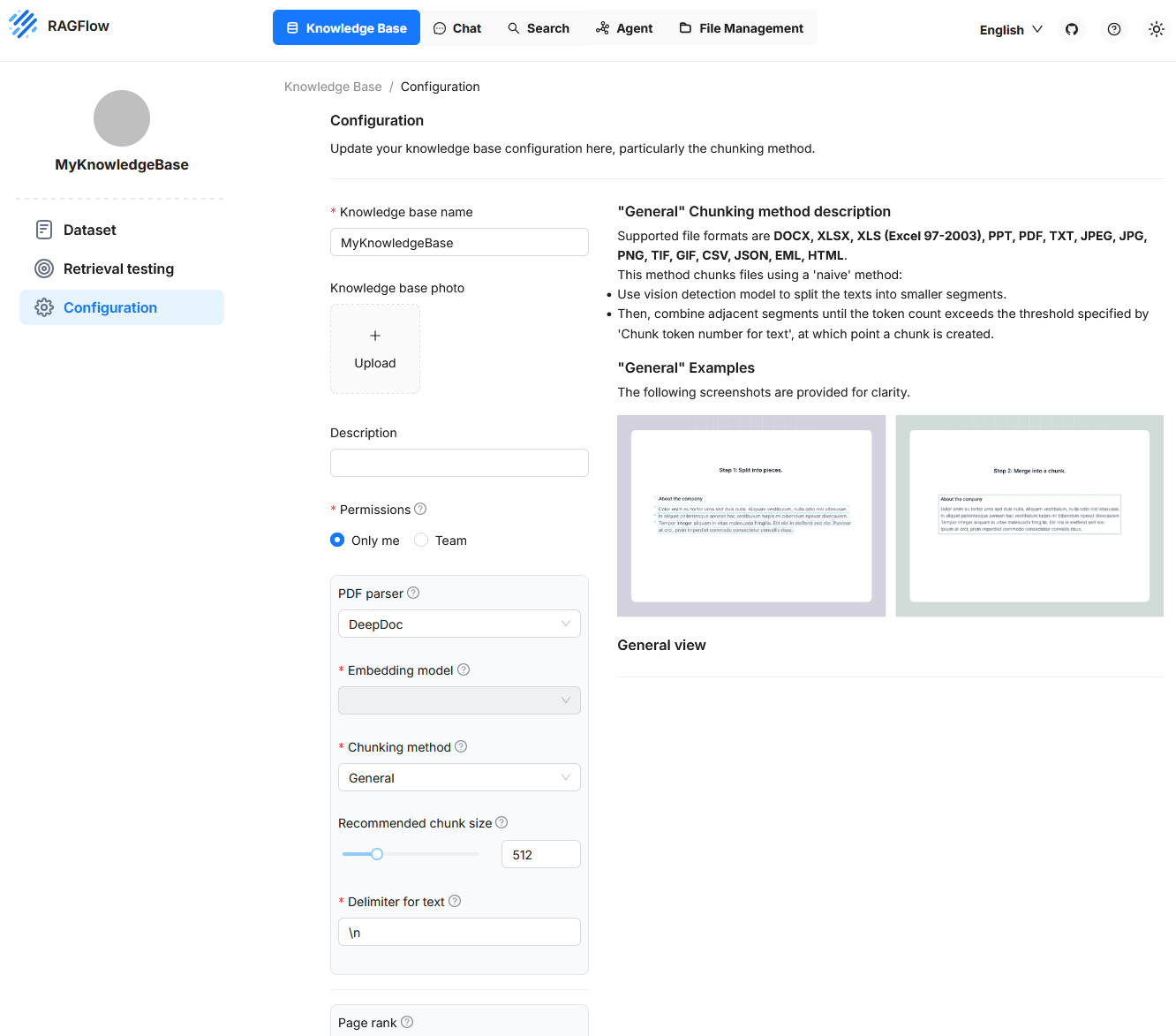
In this section, key properties are defined that determine how documents are processed, decomposed, and later made available for semantic search queries. The configuration includes both structural and functional settings. On the left side, input fields and control options are offered to adjust the processing of texts and metadata. On the right side, the “General” method is visually illustrated to show how texts are first split into segments and then merged into chunks. This area allows precise control over the parsing and vectorization behavior and is particularly relevant when specific document types or use cases need to be considered.
Recommended Chunk Size
This value specifies how many tokens a chunk should contain by default. If a segment in the document contains fewer tokens than this threshold, it will be merged with subsequent segments until the total number exceeds the defined limit. Only then is a new chunk created. However, no new chunk is formed as long as no explicit delimiter is detected. This setting influences how compact or finely resolved the contents of the Knowledge Base can be queried later.
Delimiter for Text
A delimiter is a special character or character sequence that serves as a separation signal between text sections. Examples include line breaks or custom markers like ## or specific punctuation sequences.
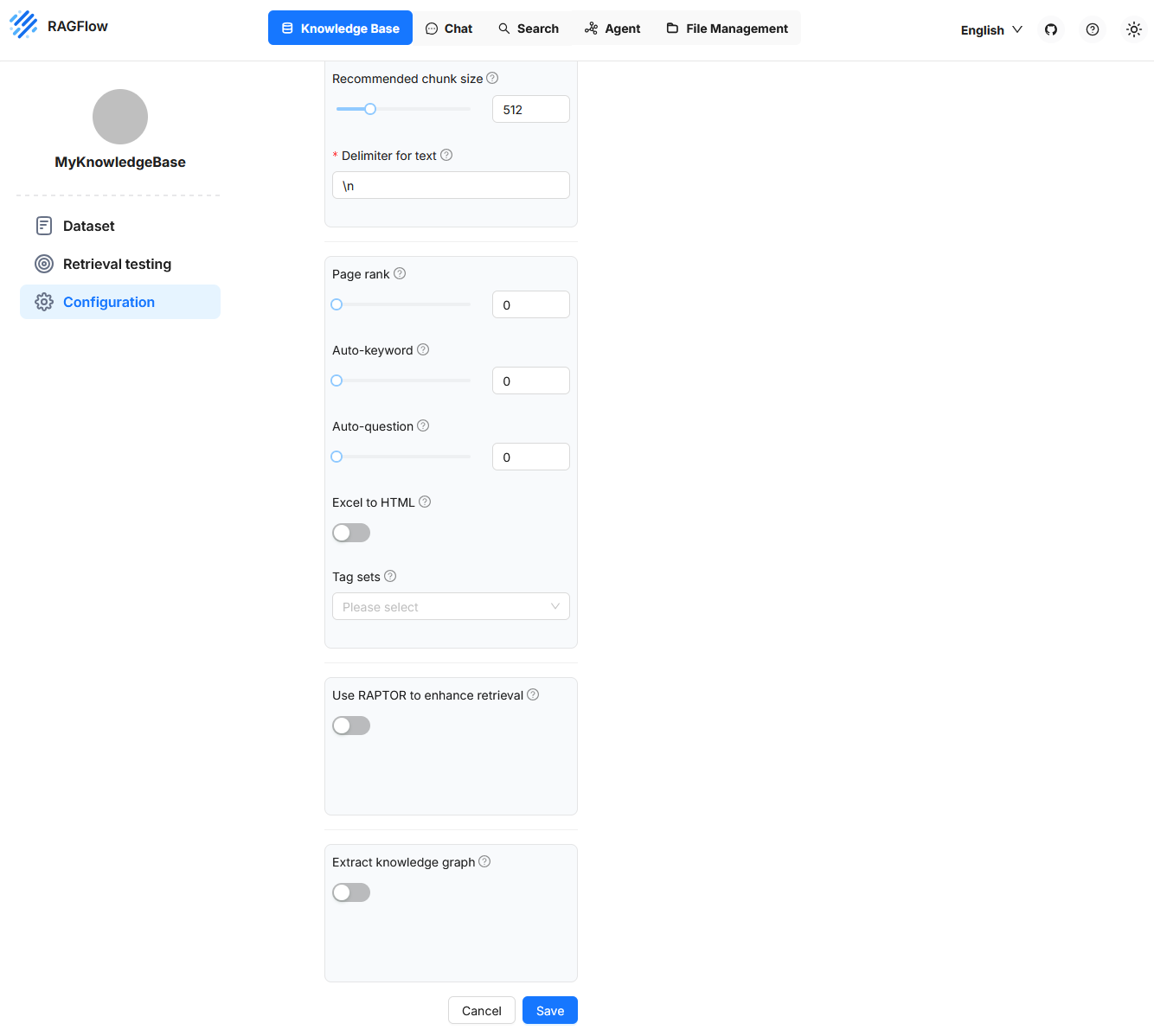
Page Rank
With this setting, a Knowledge Base can be prioritized. A higher page rank value ensures that content from this source is preferred in competing hits. The value is added to the calculated similarity and thus influences the sorting of results. This allows certain data sources to be weighed specifically, for example if they are considered particularly reliable.
Auto-Keyword
This function causes key terms (keywords) to be generated automatically for each chunk. These terms can later help in the query by increasing the hit probability for questions with matching keywords. Extraction is performed by a language model and requires additional computing resources. The identified terms can be viewed afterwards and adjusted if necessary. A value of 2, for example, means that two key terms are generated for each chunk.
Auto-Question
This feature automatically generates possible questions from the content of a chunk. These serve to increase the relevance of a chunk for corresponding user queries. This function also uses a language model and is fault-tolerant. If question generation fails, the chunk remains intact. The questions can be reviewed later and manually supplemented or corrected if necessary.
Excel to HTML
This setting concerns the processing of Excel files. If the option is disabled, the contents are interpreted as key-value pairs. If enabled, the tables are converted into HTML structures. Tables with more than twelve rows are divided into multiple blocks. This structuring is helpful if the table structure should be preserved in the result display.
Tag Sets
This function allows text sections to be tagged specifically with keywords from a predefined vocabulary. Such a vocabulary can consist, for example, of entries like Data Protection, Contract Law, Employment Law, Tax Liability. When a document with legal content is processed, the system checks each section to see if one of these terms is contained or semantically addressed.
The text sections, i.e. the chunks, are formed independently of the tag set based on the chosen chunking settings. Tagging occurs only after chunk formation. If a chunk contains a term from the tag set or is semantically equivalent to it, it is tagged with the corresponding tag. This tagging adds structured metadata to the chunk that can later be considered in search queries. For example, you can filter specifically for all sections tagged Data Protection or give them greater weight in relevance ranking. The assignment is based on a fixed, controlled vocabulary and thus differs significantly from the Auto-Keyword procedure, in which a language model independently derives relevant terms from the text without being bound to a predefined term list.
Extract knowledge graph
The Extract knowledge graph function automatically creates a knowledge graph from the existing chunks of a Knowledge Base. Entities, relations, and their connections are extracted and stored in a structured form. The goal is to make the logical relationships between terms and statements explicitly visible and machine-usable.
Such a graph enables answering complex queries where information from multiple chunks must be logically linked. This is especially relevant for so-called multi-hop questions, where an answer is not directly found in a single text section but is composed of several pieces of information.
Extraction is model-driven during or after parsing. If you activate this function, RAGFlow automatically analyzes the chunks for typical patterns such as subject-predicate-object structures, causal dependencies, or hierarchical assignments. The results flow into a graph structure that in turn can be used as the basis for more precise and structured retrieval processes.
This function forms the basis for the later activation of RAPTOR, which uses this graph to generate targeted, logic-based answer chains.
Use RAPTOR to Enhance Retrieval
The Use RAPTOR to enhance retrieval function in RAGFlow activates an advanced information querying procedure that is based on the use of a knowledge graph. This knowledge graph must have been generated previously by the Extract knowledge graph function.
A classical retrieval searches for the chunks that best match the query content for a user request. These chunks are individually scored, sorted in order, and made available to the language model for answer generation. However, each chunk is considered independently.
RAPTOR extends this mechanism: instead of evaluating only individual chunks, the system analyzes the relationships between multiple chunks via the constructed knowledge graph. It performs multi-step, logic-based connections. This means that an answer can be found even if the relevant information is not contained in a single chunk but is distributed across several chunks and must be logically linked.
Chat
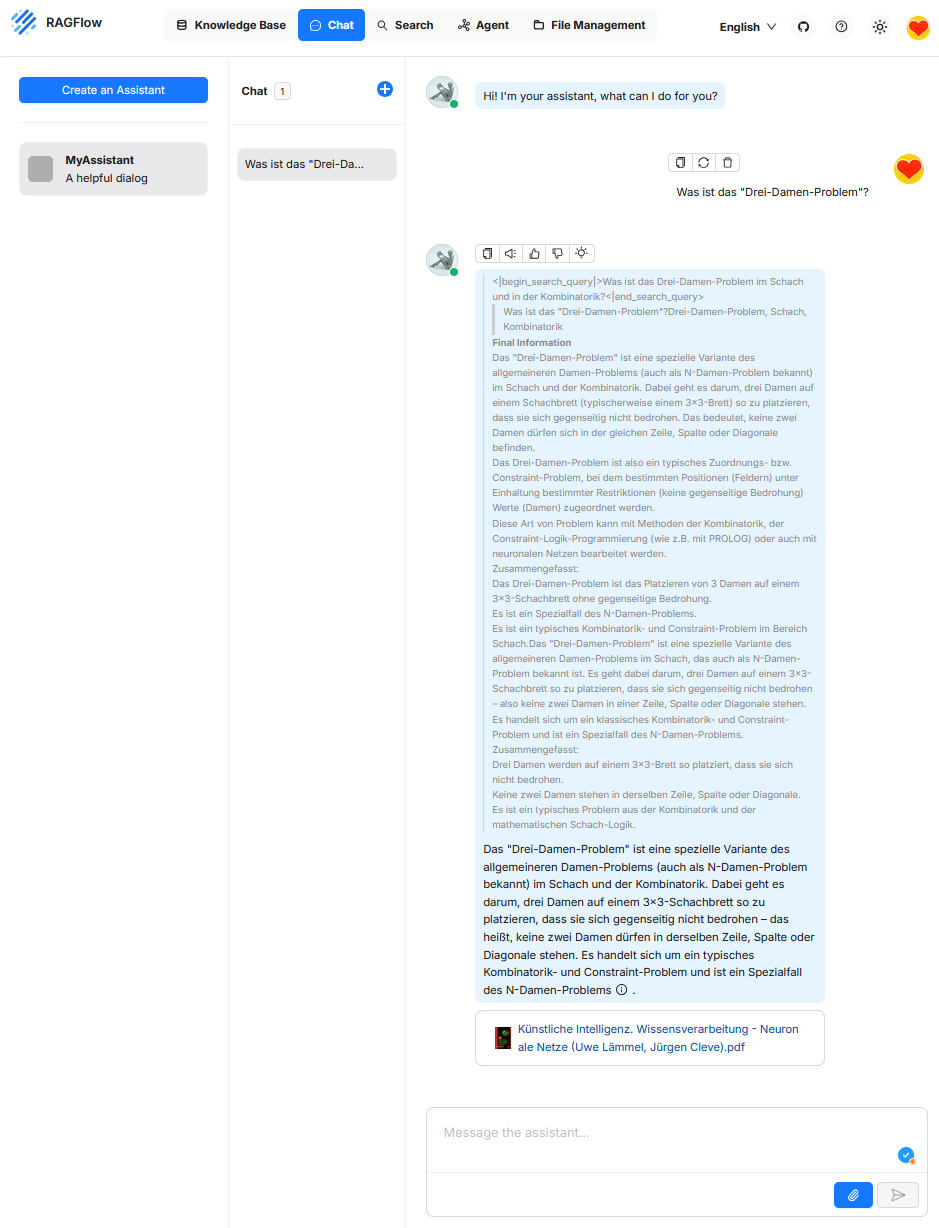
The “Chat” function serves as the user interface for interactively querying a retrieval-supported system. A natural language input from the user is interpreted by a large language model and combined with the aim of extracting relevant information from a connected knowledge source. The chat component thus forms the central control panel for access to RAGFlow’s retrieval and generation logic and enables exploratory, question-driven, and interactive exploration of document content. Unlike classical chatbots like ChatGPT, the answer is not based on the model’s general world knowledge, but on the content retrieved from the knowledge base.
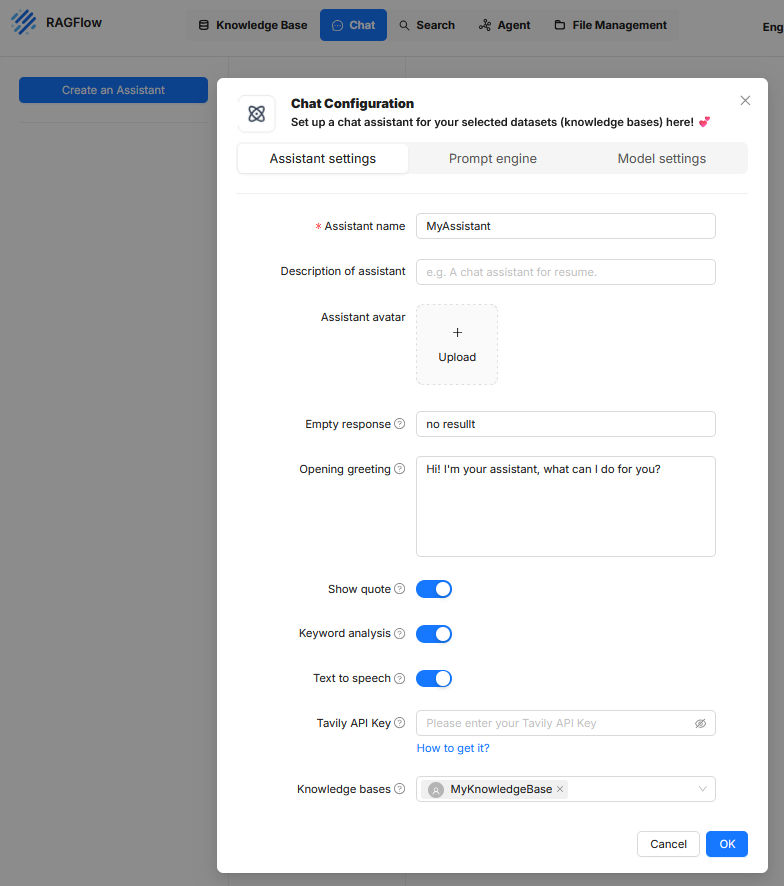
In RAGFlow, an “Assistant” refers to a configurable unit for conducting user-guided dialogues in which information from defined knowledge bases is retrieved and processed by a language model. Setting up an assistant is done via a dialog-guided configuration divided into three thematic tabs: “Assistant settings”, “Prompt engine”, and “Model settings”.
Assistant settings
This area defines the metadata and the external behavior of the assistant in the user interface. It contains the following settings:
- Assistant name denotes the internal name of the assistant.
- Description of assistant is an optional text field to describe the intended use.
- Assistant avatar allows uploading an image to visualize the assistant.
- Empty response sets the text displayed when no suitable answer can be generated.
- Opening greeting contains a greeting message that appears at the start of the interaction.
- Show quote enables displaying source citations if document references are available.
- Keyword analysis controls the detection of key terms to improve the search query.
- Text to speech enables a speech output of the answer content.
- Tavily API Key allows integration of external search services to enrich context data.
- Knowledge bases establishes the connection to one or more knowledge sources on which the answer generation is based.
Prompt engine
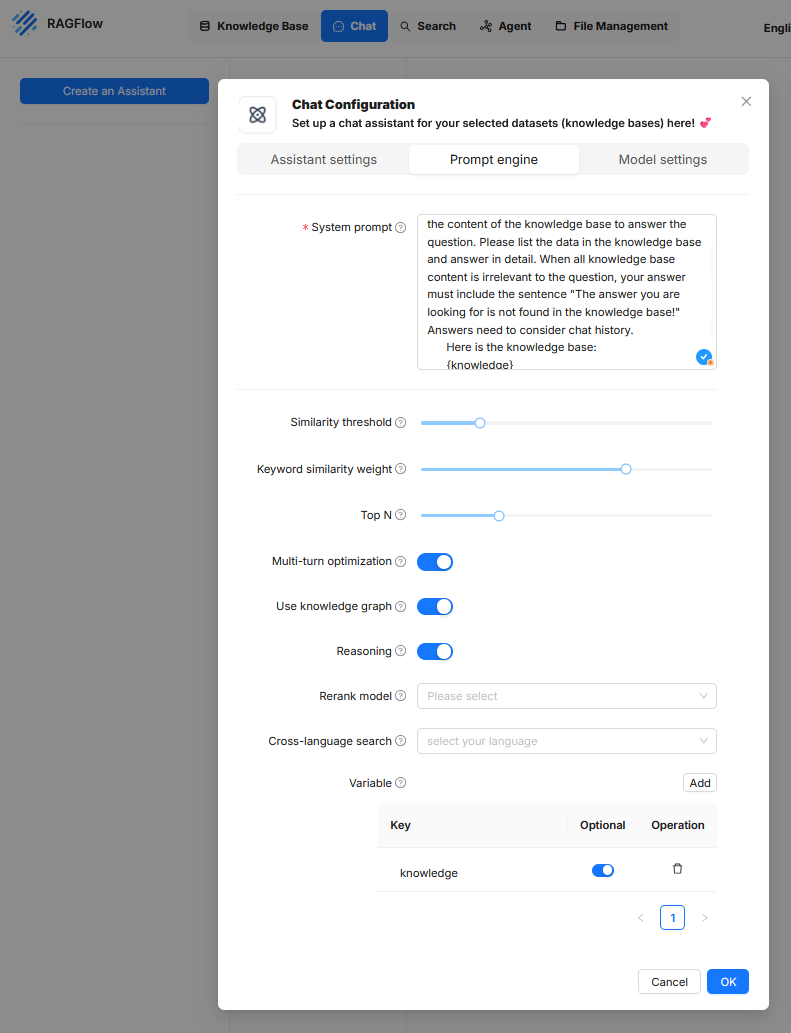
In this tab, the internal instructions and search strategies are defined with which the language model accesses the knowledge base and processes results.
Systemprompt
Is a fixed control text that is provided to the language model with every request. It contains clear instructions on how the model should respond to the contents delivered by the retriever. This prompt text can also govern the structure of the response, the consideration of the chat history, or the formatting of source citations.Similarity threshold
This threshold defines from which semantic similarity a document excerpt is considered relevant and forwarded to the language model. A higher value means that only very closely related content is considered. A lower value increases tolerance for divergent but possibly still informative content. The threshold directly affects the number and quality of retrieved context passages.Keyword similarity weight
This parameter determines the extent to which the match of key terms (tokens with high weight) is included in the relevance assessment. A high value means that exact terms are weighted more heavily, while a low value prioritizes semantic proximity at the sentence or meaning level. This weighting influences whether the focus is more on formal matching or content similarity.Top N
Defines the maximum number of context passages to be taken from the knowledge base and made available to the language model. This selection is made based on relevance scoring. A low value like 3 or 5 leads to a more concise context but may omit relevant additional information. Higher values can improve answer quality but may lead to longer prompts and possibly exceed the model’s token limit.Multi-turn optimization
This setting enables context management across multiple conversation rounds. This means that the chat history is considered so that follow-up questions or references to previous statements can be interpreted correctly. This option is especially necessary for complex dialogues or follow-up questions, but it increases the complexity of the prompt structure and the token volume.Use knowledge graph
When this option is enabled, a structured knowledge graph is included in answer generation in addition to unstructured texts. This graph can contain entities and relations systematically extracted from the knowledge base. This allows the model to better capture logical relationships between concepts and provide structured answers. The prerequisite is that a corresponding knowledge graph is available in the system.Reasoning
This function extends the generative processing with logical inference. The model is thus instructed not only to reproduce content but to derive statements from the context data, such as recognizing relationships or uncovering implicit meanings. This can increase the substantive depth of the answers but carries a certain risk of unwanted hallucinations if the data basis is not clear.Rerank model
If enabled, an additional model is used to re-evaluate the documents delivered by the retriever and reorder them. This serves as a quality control for the result list, especially when the primary retrieval mechanism yields many irrelevant or competing hits. Specialized models can be used here, e.g. transformer models optimized for ranking or comparison.Cross-language search
This option allows a target language to be defined for cross-language search queries. This enables users to ask questions in one language (e.g. German) while the knowledge base is in another language (e.g. English). The prerequisite is that the retrieval model and the language model can work multilingual. The results are then automatically translated or interpreted accordingly.Variable
Here, placeholders are defined that can be used within the system prompt. When using the placeholder {knowledge} in the system prompt, it is automatically replaced at runtime by the text retrieved from the knowledge base. For example, if the question “What is a requirements specification?” is asked in the chat, the system searches for semantically matching text passages in the connected knowledge source. If it finds the sentence “A requirements specification describes the client’s requirements for the contractor’s services,” this is selected as context. If the system prompt contains the phrase “Answer the question exclusively based on the following content: {knowledge}”, the system replaces the placeholder with the found passage. The language model then receives the complete prompt: “Answer the question exclusively based on the following content: A requirements specification describes the client’s requirements for the contractor’s services.” This prompt, together with the original user question, is passed to the model, which generates an answer from it. Using placeholders like {knowledge} enables a generic prompt structure that is automatically filled with the relevant content at runtime. Additional placeholders can be defined, for example for the question, timestamps, or metadata. In this way, the prompt can be made reusable and modular.be filled.
Model settings
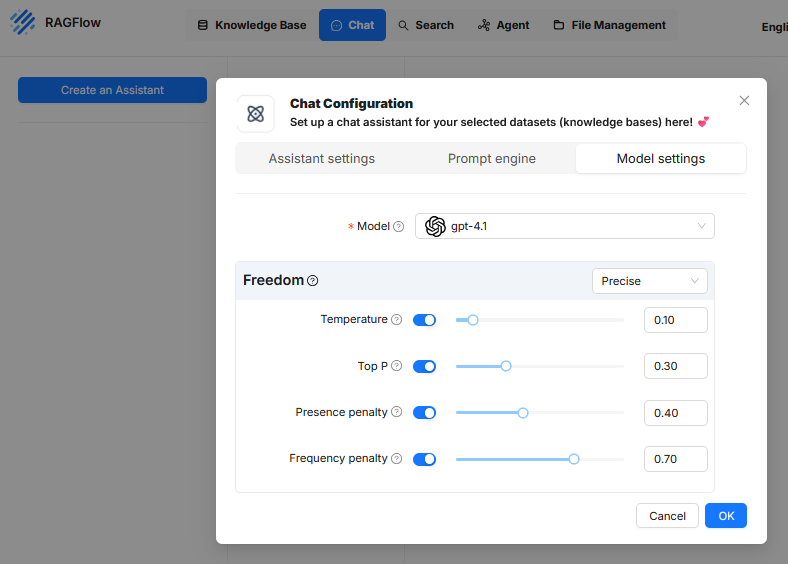
In the Model settings tab of the chat configuration in RAGFlow, parameters are defined that control the response behavior of the underlying language model. These settings do not affect the selection of content from the knowledge base but rather how the model works with this content and generates texts based on it. The goal is to regulate answer quality, accuracy, expression, and redundancy in a targeted manner. The following parameters are available:
Model
Here, the language model used to generate the answers is selected. In the current configuration, “gpt-4.1” is activated. This selection significantly determines the performance, answer style, and token limits of the assistant.Freedom (profile preset)
In the user interface, a predefined profile can be selected, such as “Precise”. This profile groups the above parameters into a fixed combination.- Precise: Configures the model for maximum factual fidelity and deterministic outputs. The answers are consistent and closely aligned with the data basis. Typically, temperature and Top P are set to very low values.
- Improvise: Configures the model for maximum creativity and variability. This setting is intended for generating ideas and diverse texts. Temperature and Top P are set to high values.
- Balance: Chooses a middle configuration that balances reliable information with natural, conversational language.
Temperature
This parameter controls the randomness in text generation.- A low value (e.g. near 0) forces the model to almost always choose the most obvious and safest wording. If the sentence starts with “The sky is…”, the model will almost certainly choose “blue”. The texts are thus very precise, fact-oriented, and often identical for the same request.
- A high value (e.g. near 1) encourages the model to also choose rarer and more creative words that could fit. For “The sky is…”, it might then choose “cloudless”, “endless”, or “breathtaking”. The texts thus become more varied and unpredictable but may also lose accuracy.
Top P
To understand how “Top P” works, you first need to look at the process by which an AI generates text. An AI does not write a sentence as a whole but word by word. To determine the next word, the AI analyzes the text written so far. If the text so far is “The weather today is”, “the next word” refers to the word that should follow directly. After this analysis, the AI internally creates a huge list of all the words it knows (its entire vocabulary) and assigns each a probability of how well it would fit as the next word. This is where parameters like “Top P” come into play. The “Top P” parameter is a filter applied to this huge list of all possible words. Its task is to create a small, filtered “selection pool” for the current step. To do this, it selects the most probable words from the top of the list and adds up their probabilities until the sum reaches the set Top P value. Only the words that are included in this calculation end up in the final selection pool. The “next word” is then finally chosen from this smaller pool.A simple example illustrates the process: Suppose the sentence begins with “The weather today is”. The AI calculates various probabilities for the next word, for example: ‘sunny’ has a 50% chance, ’nice’ 25%, and ‘rainy’ 15%. If the Top P value is set low at 0.70 (or 70%), the AI creates a selection pool by adding up the most probable words until the 70% mark is exceeded. In this case, it takes ‘sunny’ (50%) and ’nice’ (25%). The sum is 75%, exceeding the threshold. The pool thus consists only of the two words ‘sunny’ and ’nice’, making the answer very predictable. If the Top P value is set high at 0.95 (or 95%), the pool is larger. In addition to ‘sunny’ and ’nice’ (a total of 75%), ‘rainy’ (15%) is also included, since the new sum of 90% is below the 95% threshold. The pool now contains three words, allowing a more varied answer.
Presence penalty
This value influences whether the model revisits topics or terms that have already been mentioned in its response. Once a certain topic or keyword has been used, it is given a negative weighting. This makes it less attractive for the AI to address the same topic again. For example, if the AI has already mentioned the “engine” when describing a car, the Presence Penalty ensures that it tends to describe new aspects like the “brakes” or the “interior” later, rather than returning to the engine. This leads to more comprehensive and thematically broader responses. A higher value (e.g. 0.40) ensures that the model addresses new content to avoid repetition of concepts. This can be useful to reduce uniform or redundant passages.Frequency penalty
The Frequency Penalty is a rule that reduces the frequent repetition of exactly the same words or phrases. Unlike the Presence Penalty, which penalizes a topic only once, the Frequency Penalty increases the negative weighting for a word with each individual repetition. The more often a word has already been used, the less likely it is to be used again. For example, if the AI writes “The landscape is beautiful”, the word “beautiful” becomes less likely for the next word choice. Instead of writing “and the view is also beautiful”, the AI is encouraged by the penalty to choose a linguistic alternative, such as “and the view is breathtaking”. This forces a more varied word choice and makes the text sound more natural. A high value (e.g. 0.70) causes the model to avoid repeats of the same terms. This improves linguistic variation and prevents certain expressions from appearing excessively often, especially in longer responses or systematically structured texts.
These configuration elements only affect the language model itself.
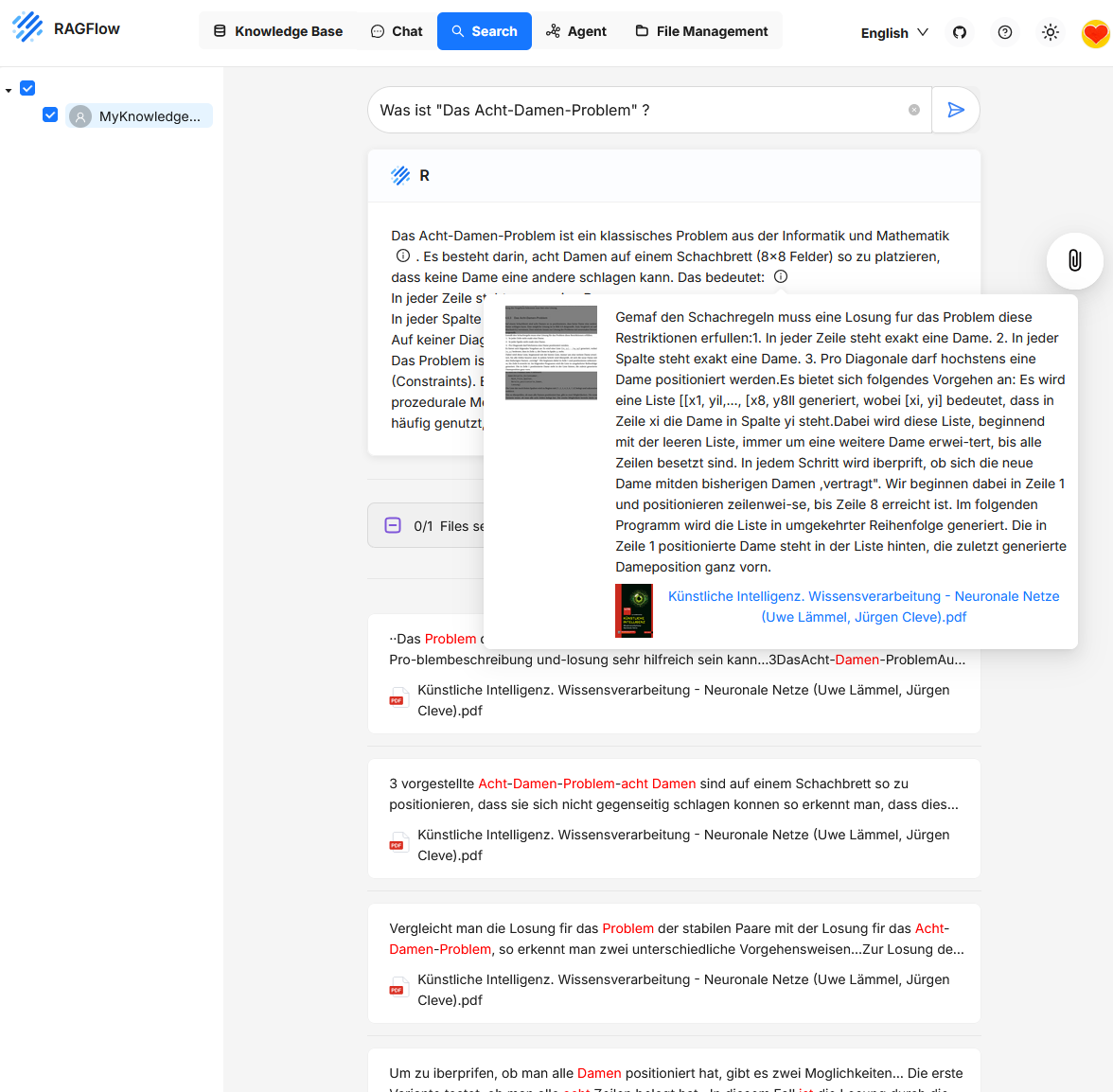
Search
Search is used to retrieve information from the contents of one or more Knowledge Bases. Unlike in chat, no generative answer is created; instead, the chunks that match the search query are displayed.
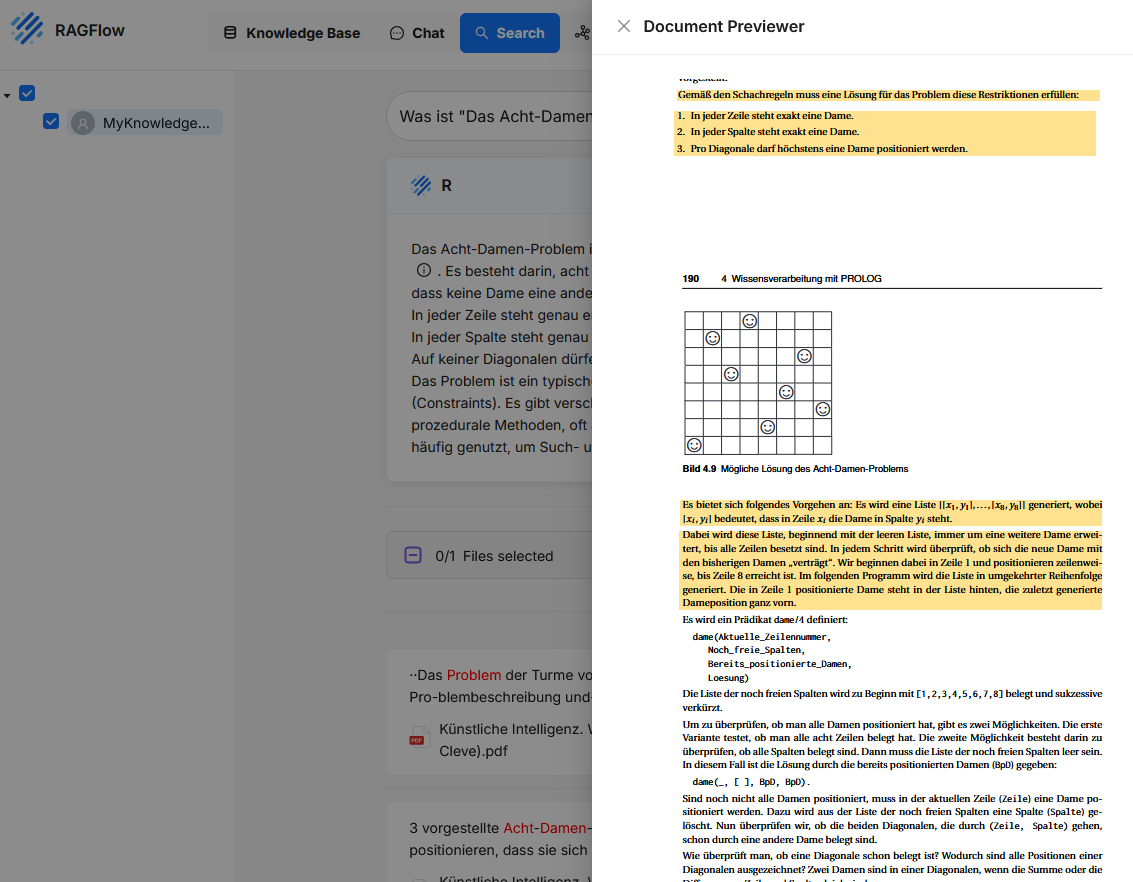
Users enter a text query in the search field, such as a question or keyword. RAGFlow then searches the connected Knowledge Bases for text sections with high content similarity. The hits are displayed with an excerpt of the found content, along with the file name and position in the document. Clicking on a hit opens a preview with the complete chunk and its context.
Unlike the chat function, Search focuses on direct content access and traceability. The function is particularly suitable for research, content validation, targeted review, or checking indexing results.
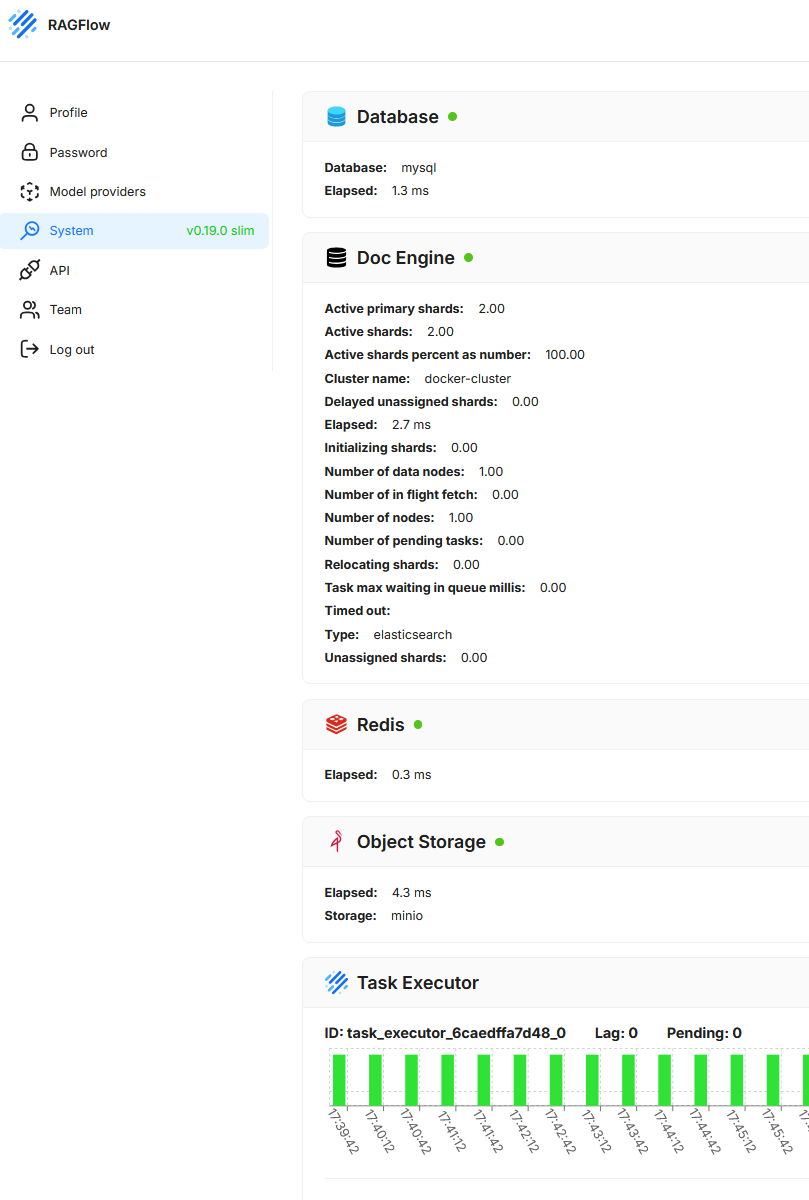
System
This section shows the current technical status and operational readiness of the underlying system components. The goal is to provide a quick overview of the functionality and performance of the services required to run the application.
- Database
Shows the status and response time of the relational database used (here MySQL). - Doc Engine
Displays information about the vector or search database (here Elasticsearch), including shard distribution, cluster name, running tasks, latencies, and potential error states. - Redis
Provides information about the availability and response time of the caching system. - Object Storage
Checks whether the object storage (here MinIO) is correctly connected and functional. In RAGFlow, Object Storage is used to persistently store documents and other files uploaded by users or processed by the system. - Task Executor
Shows running background processes and their load distribution. Active tasks, backlog (lag), and pending tasks are visualized.
File Management
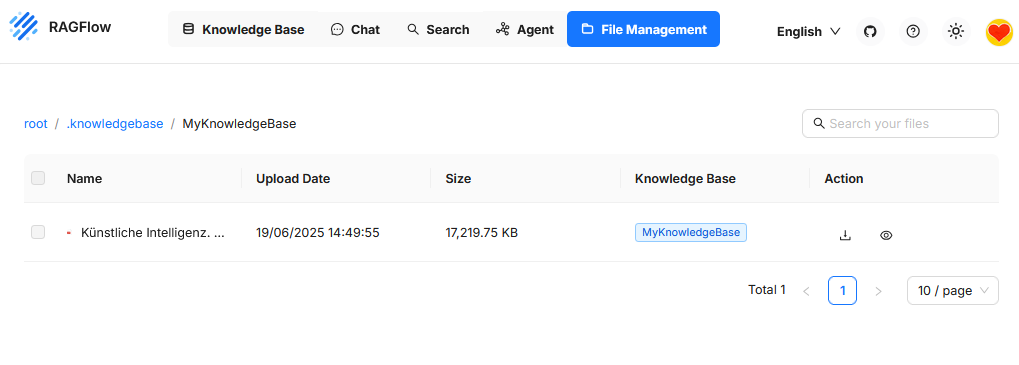
This section is used to manage all uploaded files used in one or more Knowledge Bases. Here, documents are stored, displayed, searched, and structured.